
You’ve spent hours coaching Claude through your tone, your structure, your word choice — again.
Every new chat, every new chapter, you’re copying instructions from a doc. Repasting the same preferences. Explaining — for the tenth time — how you want lists formatted or when to use examples.
There’s a better way.
It’s called a Book Writing Skill in Claude — and once you set it up, Claude remembers how you work. You stop repeating yourself. You start writing.
What Is a Book Writing Skill in Claude
A Skill in Claude is a saved set of instructions that tells the AI how you write, what you prioritize, and how it should respond.
Think of it like a custom editor profile. You configure it once. Claude applies it automatically.
No more pasting the same prompt every time you open a new conversation.
No more explaining your tone mid-draft.
Skills sit inside Claude Projects — they’re not standalone tools. But unlike Projects (which bundle context, files, and conversations), Skills focus on behavior: how you want Claude to write, structure, and format your content.
You can create Skills for different types of writing: nonfiction chapters, fiction scenes, blog posts, marketing emails. Each Skill defines a consistent workflow.
Why Book Authors Need a Claude Skill
Most authors treat AI like a blank assistant. You feed it a prompt. It generates a response. You tweak. Repeat.
That works — until you’re 30,000 words into a manuscript and Claude suddenly forgets your tone guidelines or starts formatting paragraphs differently than chapter one.
A Skill fixes that.
It keeps Claude consistent across your entire book — not just one conversation. It reduces the amount of prompting you do per session. It makes collaboration with AI feel like working with someone who already knows your voice.
Without a Skill, you’re reminding Claude what you need every single time.
With a Skill, you focus on content — not instructions.
What to Include in Your Book Writing Skill
Your Skill should contain everything Claude needs to produce drafts that sound like you — not like generic AI output.
Here’s what belongs inside:
Writing Style and Tone
Define how you write: casual or formal. Short paragraphs or long. Active voice or passive. First person or third.
If you write conversational nonfiction, say that. If you prefer academic precision, say that too.
Example: “Write in a conversational tone. Use short paragraphs — no more than three sentences. Avoid passive voice. Address the reader directly using ‘you.'”
Audience and Purpose
Who are you writing for? What do they already know? What problem does your book solve?
Claude writes better when it understands who’s reading.
Example: “This book is for self-published authors who want to use AI without losing their voice. Assume they’re familiar with basic writing tools but new to AI.”
Structure and Formatting
How do you organize ideas? Do you use subheadings? Bullet points? Examples after every concept?
Define your preferred structure so Claude doesn’t invent its own.
Example: “Start each section with a clear statement. Use H3 subheadings for subtopics. Include one real-world example per major point. No bulleted lists unless specifically requested.”
Recurring Instructions
These are the things you find yourself saying in every prompt: “Don’t use corporate jargon.” “Never start with ‘In today’s fast-paced world.'” “Keep sentences under 25 words.”
Put them in the Skill.
Example: “Avoid hype language. Never use ‘game-changer,’ ‘revolutionize,’ or ‘unleash.’ No exclamation marks. No motivational fluff.”
Research and Accuracy Guidelines
If you’re writing nonfiction, tell Claude what level of detail you expect. Should it suggest sources? Should it flag claims that need verification?
If you’re writing fiction, define how it should handle world-building consistency or character voice.
Example: “Flag any statistics or named case studies. Never fabricate research. If no example exists, make the point directly without inventing one.”
How to Turn Any Book into a Claude Skill
You don’t need to reverse-engineer a book manually.
Instead, upload the book (or a representative sample of it) to Claude and let the AI analyze the writing style for you.
Analyze the attached book and create a reusable Claude Skill that captures its writing style. Include instructions for tone, voice, sentence structure, paragraph length, chapter organization, formatting, transitions, vocabulary, and any recurring writing patterns. Write the Skill as clear, reusable instructions that can be applied to future writing projects without copying the original text.
Claude will identify patterns such as:
- writing tone and voice
- sentence and paragraph length
- chapter structure
- heading hierarchy
- pacing and transitions
- vocabulary preferences
- formatting conventions
- use of examples, stories, or case studies
- recurring stylistic patterns
Once Claude generates the Skill, review it and remove any instructions that are too specific to the original book. You can also add your own preferences—for example, asking Claude to write shorter paragraphs, include more examples, or use a more conversational tone.
The result is a reusable writing Skill that captures the style of the original book without requiring you to analyze hundreds of pages manually.
Once Claude generates the Skill, review it and remove any instructions that are too specific to the original book. You can also add your own preferences—for example, asking Claude to write shorter paragraphs, include more examples, or use a more conversational tone.
When you’re happy with the result, save it as a new Skill in Claude by clicking Create Skill, giving it a descriptive name, and saving it to your account. Whenever you start a new chat or Project, simply select that Skill from the Skills menu to apply its instructions automatically.
The result is a reusable writing Skill that captures the style of the original book without requiring you to analyze hundreds of pages manually.
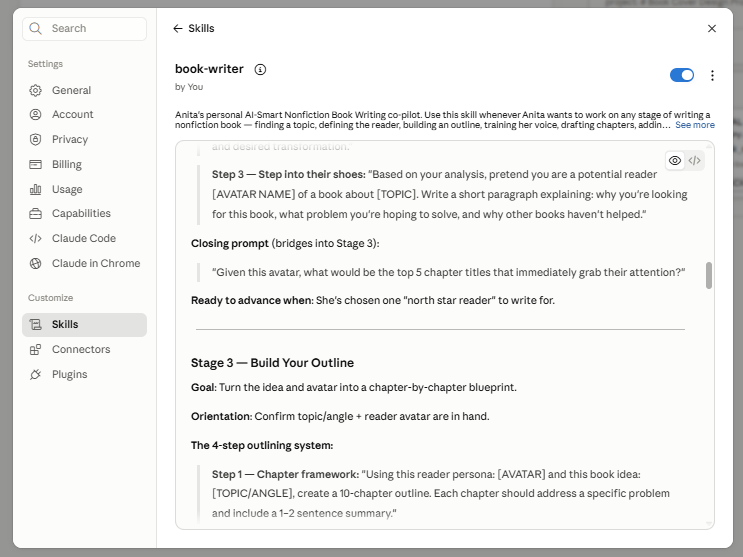
Claude book writing skill - example
How to Create a Claude Skill for Writing Nonfiction
You don’t have to define your writing style from scratch.
If you’ve already written a book, blog posts, newsletters, or even a few sample chapters, upload them to Claude and ask it to build a reusable Skill.
Prompt for Creating a Nonfiction Claude Skill
Analyze the attached nonfiction manuscript and create a reusable Claude Skill that captures my writing style. Include instructions for target audience, tone, voice, chapter organization, heading structure, sentence and paragraph length, formatting, transitions, use of examples, storytelling patterns, terminology, and any recurring writing habits. Write the Skill as clear, reusable instructions that can be applied to future nonfiction writing projects without copying the original text. Suggest improvements where my writing style could be more consistent.
Claude will typically identify:
- your target audience
- writing tone and voice
- chapter organization
- heading hierarchy
- paragraph and sentence length
- formatting preferences
- use of stories, examples, and case studies
- recurring phrases and terminology
- common strengths and inconsistencies
Review the generated Skill and adjust it to better match your goals. For example, you might ask Claude to:
- write more conversationally
- use shorter paragraphs
- include more practical examples
- end every section with an actionable takeaway
- avoid promotional language
- cite sources whenever factual claims are made
Because the Skill is reusable, every future writing session starts with the same guidance, helping Claude produce more consistent chapters with far less prompting.
How to Create a Claude Skill for Writing Fiction

Fiction Skills work the same way—but instead of analyzing instructional writing, Claude analyzes your storytelling.
Upload several chapters from your manuscript—or a published novel that represents the style you’re aiming for—and ask Claude to transform the writing patterns into a reusable Skill.
Prompt for Creating a Fiction Claude Skill
Analyze the attached fiction manuscript and create a reusable Claude Skill that captures my storytelling style. Include instructions for narrative voice, point of view, tense, pacing, scene structure, dialogue style, character consistency, world-building, descriptive style, chapter flow, emotional tone, and any recurring storytelling patterns. Write the Skill as clear, reusable instructions that can be applied to future fiction writing projects without copying the original text. Suggest improvements that would make the narrative more consistent across the entire manuscript.
Claude can automatically identify elements such as:
- narrative perspective and tense
- pacing and scene length
- dialogue style
- paragraph rhythm
- character personalities and speech patterns
- world-building rules
- descriptive style
- emotional intensity
- chapter openings and endings
- recurring themes and motifs
After Claude generates the Skill, review it and customize the instructions to match your creative goals. For example, you might ask it to:
- keep dialogue concise
- avoid clichés
- reveal character emotions through actions instead of exposition
- maintain consistent character voices
- end every scene with tension or an unanswered question
- preserve continuity across chapters
Once you’ve refined the Skill, every future conversation inside your Project will follow the same storytelling rules, helping Claude produce more consistent scenes, chapters, and revisions throughout your manuscript.
The fastest way to create a Claude Skill—whether for nonfiction or fiction—is to upload examples of your writing and let Claude generate the initial instructions. You can then refine the Skill to match your preferred style, structure, and workflow instead of documenting everything manually.
How Claude Skills Work Alongside Projects
Skills and Projects aren’t the same thing — but they work together.
A Project in Claude bundles everything related to a specific book: your manuscript files, research notes, character sheets, outlines. It’s your workspace.
A Skill defines how Claude behaves inside that Project. It’s your instruction manual.
You can use the same Skill across multiple Projects — if you’re writing a series, for example, and want consistent tone across all three books.
Or you can create a unique Skill for each Project if you’re switching genres or writing styles.
Projects hold the content. Skills shape the output.
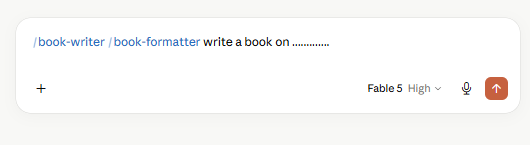
Claude book writing skill - example
When to Update Your Claude Skill
Your Skill isn’t static. Update it when you notice Claude drifting from your preferences.
Common triggers:
- You keep correcting the same formatting issue.
- Claude starts using words or phrases you’ve asked it to avoid.
- Your tone shifts mid-book and you want Claude to match the new direction.
- You add a new character or plot thread that requires updated consistency rules.
Don’t wait until your draft is finished. Adjust the Skill as you write.
What Claude Skills Don’t Do
Let’s be clear about limitations.
A Skill won’t turn Claude into a novelist who writes your book for you. It won’t generate brilliant metaphors or invent plot twists.
It keeps Claude consistent. That’s it.
You still need to provide context in each conversation. You still need to guide the narrative. You still need to edit every draft Claude produces.
Skills reduce repetitive prompting. They don’t eliminate creative decisions.
How to Test If Your Skill Is Working
After you create a Skill, run a test before you start drafting chapters.
Pick a section of your book — a chapter opening, a dialogue scene, a how-to section.
Prompt Claude to write it. Don’t add extra instructions. Just say: “Write the opening of Chapter 3 based on this outline.”
Read the output.
Does it match your tone? Your structure? Your formatting preferences?
If not, adjust the Skill. Be more specific. Add examples. Clarify what you mean by “conversational” or “tight pacing.”
Test again. Refine until Claude produces drafts that need minimal correction.
Common Mistakes When Building a Skill
Most authors write Skills that are too vague or too rigid.
Too vague: “Write in a friendly tone.” Claude doesn’t know what friendly means to you.
Too rigid: “Every paragraph must be exactly two sentences.” Claude will follow the rule even when it hurts readability.
Strike a balance. Be specific about what matters. Be flexible about execution.
Another mistake: overloading the Skill with instructions.
If your Skill is 2,000 words long, Claude won’t apply it consistently. Keep it under 500 words. Focus on what affects every draft, not edge cases.
How to Use Multiple Skills for Different Writing Tasks
You don’t need one Skill for everything.
Create separate Skills for different stages of your book:
- A Skill for drafting chapters.
- A Skill for editing and tightening prose.
- A Skill for writing marketing copy — book descriptions, social posts, email sequences.
Switch between them depending on the task. Claude adapts instantly.
You can also create Skills for different books if you write in multiple genres. A thriller and a self-help guide shouldn’t sound the same.
Why This Matters More Than You Think
Most authors using AI treat it like a search engine. You ask a question. You get an answer. You move on.
That’s useful for research. It’s terrible for writing a book.
Books require continuity. Voice. Structure. Consistency across 50,000+ words.
If you’re pasting instructions every time you open Claude, you’re not writing faster. You’re just outsourcing repetition.
A Skill shifts the dynamic. Claude becomes a collaborator who knows how you work. You stop managing the tool. You start using it.
That’s when AI actually helps.