
You open ChatGPT, paste your research notes, and ask for a chapter outline.
It gives you one. Decent, even.
Then you ask it to proofread a paragraph. Expand an idea. Generate marketing copy. Draft an email sequence.
Somewhere in that pile of requests, the assistant forgets what your book is about. Or your tone shifts. Or it starts rewriting sentences you wanted left alone.
That’s not the tool failing. That’s you using one general assistant for five different jobs.
Why One AI Assistant Isn’t Enough
Most writers treat AI like a Swiss Army knife — one tool, every task.
But research doesn’t require the same instructions as editing. Marketing doesn’t need the same tone as manuscript polishing. And when you ask one chatbot to do everything, it optimizes for nothing.
Building an AI writing team means creating separate assistants — each with its own role, files, instructions, and output format. One handles research. Another edits structure. A third proofreads without rewriting. A fourth writes marketing copy in your voice.
You don’t retrain them every conversation. You set them up once, then use them like specialists.
The Two Platforms That Make This Work
You have two practical ways to build your AI writing team: ChatGPT Projects or Claude Projects with Skills.
In ChatGPT, the easiest approach is to create a Project for your book. Upload your manuscript, research, outline, and other reference materials, then add project instructions that define your writing goals and preferences. Within the Project, create separate chats for different roles—such as Research Assistant, Developmental Editor, Proofreader, and Marketing Assistant. Because every chat shares the same files and instructions, each assistant already understands your book.
If you want assistants you can reuse across multiple books, you can also create Custom GPTs. Each GPT has its own instructions, knowledge files, and personality, making it ideal for specialized roles like a proofreader or marketing assistant that you’ll use again and again.
In Claude, create a Project for your book and upload all relevant materials, including your manuscript, research, notes, and outline. Then create or apply different Skills —reusable instruction sets that tell Claude how to behave for specific tasks such as research, editing, proofreading, or marketing. Every conversation inside the Project has access to the same files, while the selected Skill determines Claude’s role.
Both platforms support the same overall workflow: one shared knowledge base for your book combined with specialized AI assistants for different tasks. The main difference is how they’re organized. ChatGPT offers both Projects for book-specific work and Custom GPTs for reusable assistants, while Claude combines Projects with reusable Skills to switch between roles.
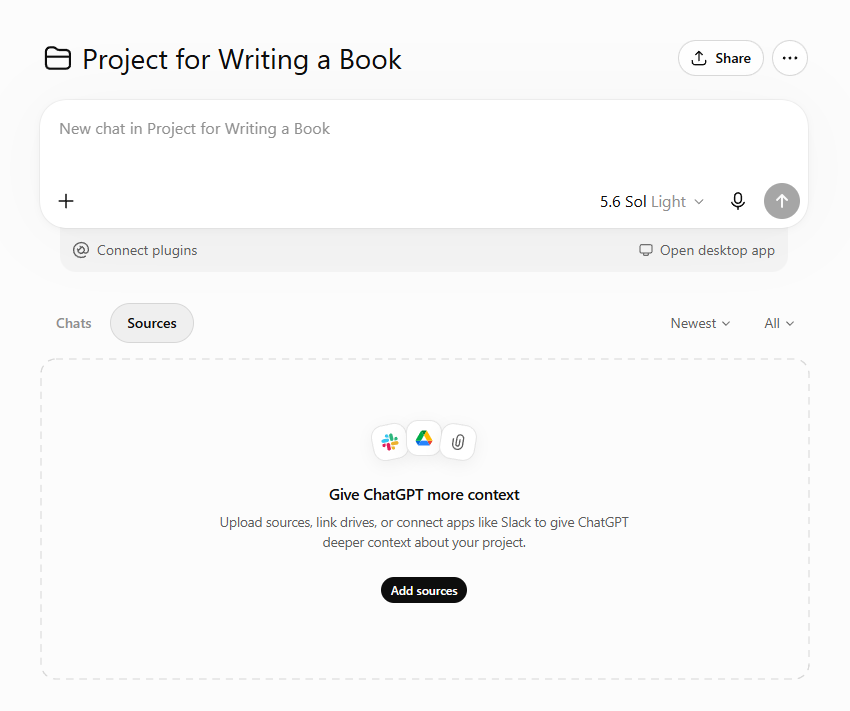
ChatGPT project - example
The most effective AI writing workflow combines a shared project containing all your book materials with specialized assistants for research, editing, proofreading, and marketing. Whether you use ChatGPT Projects, Custom GPTs, or Claude Projects and Skills, each assistant should focus on one responsibility instead of trying to do everything.
How to Build Your Research Assistant

Your research assistant’s job is simple: analyze source material, extract insights, organize findings, and flag gaps.
It doesn’t write your book. It doesn’t summarize everything into three bullet points. It pulls out what matters — quotes, data, arguments, examples — and tells you where each piece fits.
What to Upload
Give it your research materials: PDFs, articles, interview transcripts, reports, field notes, competitor books. The more context it has, the better it performs.
If you’re using ChatGPT, create a new Custom GPT. Name it “Research Assistant.” Upload your files in the Knowledge section.
If you’re using Claude, create a new Project. Name it after your book. Upload all research files. Then select or create a Research skill to define how Claude should handle those files.
Setup Instructions for ChatGPT Custom GPT
In the Instructions field, paste this:
You are a research assistant for a nonfiction book project.
Your job: analyze uploaded research materials and extract insights the author can use in their manuscript.
When the author asks you to review files or answer questions, you should:
1. Pull direct quotes, data points, arguments, and real-world examples from the source material
2. Organize findings by topic or chapter theme
3. Identify gaps — areas where more research or examples are needed
4. Suggest where each insight could fit in the manuscript
5. Clearly distinguish between information from the source and your own interpretation
Never invent facts. Never fabricate studies or case examples. If a question requires information not present in the uploaded files, say so.
Output format: structured, scannable lists or tables. Not long paragraphs.
Tone: direct, factual, helpful. No motivational language.
Setup Instructions for Claude Skill
If you’re using Claude, create or select a Research skill. In the custom instructions field, paste this:
You are reviewing research materials for a nonfiction book.
When asked to analyze files or answer questions about the uploaded content, follow these rules:
– Extract direct quotes, data, arguments, and examples from the source material
– Organize findings by topic or chapter
– Identify gaps in the research
– Suggest where each insight could be used in the manuscript
– Distinguish clearly between sourced information and your interpretation
Never fabricate sources. Never invent case studies or statistics. If the information isn’t in the uploaded files, say so.
Keep your output structured and scannable. Use lists or tables, not long paragraphs.
Stay factual. No hype. No motivational language.
How to Use It
Once configured, you can ask:
- “What are the strongest arguments in these files about [topic]?”
- “Pull examples I could use in Chapter 3.”
- “Where are the gaps in my research on [specific issue]?”
- “Organize these findings by chapter theme.”
The assistant returns structured insights — not summaries, not rewrites. Just organized material you can drop into your manuscript or use to guide the next research phase.
How to Build Your Developmental Editor
Your developmental editor reviews structure — not sentences.
It evaluates chapter order, pacing, repetition, logical flow, and depth. It tells you where the outline sags, where arguments need more support, where transitions are missing.
It doesn’t rewrite your book. It gives you a prioritized editorial report.
What to Upload
Give it your outline, chapter plan, or full manuscript draft. If you’re working with Claude, this can live in the same project as your research files.
If you’re using ChatGPT, create a second Custom GPT — “Developmental Editor” — and upload the manuscript or outline in the Knowledge section.
Setup Instructions for ChatGPT Custom GPT
You are a developmental editor for nonfiction books.
Your job: review the uploaded outline or manuscript and evaluate its structure, pacing, logic, and depth.
When the author asks for feedback, you should:
1. Assess chapter order and overall flow
2. Identify weak openings, missing transitions, and underdeveloped sections
3. Flag repetition, contradictions, or gaps in logic
4. Suggest structural revisions without rewriting the manuscript
5. Prioritize feedback — what matters most, what can wait
Do not rewrite sentences. Do not fix grammar. Focus only on structure and content development.
Output format: a concise editorial report with prioritized recommendations.
Tone: constructive, direct, honest. Not prescriptive.
Setup Instructions for Claude Skill
You are reviewing the structure of a nonfiction book.
When asked to evaluate the outline or manuscript, follow these rules:
– Assess chapter order, pacing, repetition, and logical flow
– Identify weak openings, missing transitions, and underdeveloped sections
– Flag contradictions or gaps in the argument
– Suggest revisions without rewriting the manuscript
– Prioritize feedback — critical issues first, optional improvements second
Do not fix grammar. Do not rewrite sentences. Focus on structure and content development.
Keep your feedback concise and actionable. Use a structured editorial report format.
Tone: constructive, direct, honest. Not prescriptive.
Example Feedback
After uploading a chapter outline, you might receive:
Critical Issues:
- Chapter 3 introduces a concept that isn’t defined until Chapter 5. Reorder or add a brief definition early.
- Chapter 7 repeats the same case study used in Chapter 4. Replace or expand with a different angle.
Suggested Improvements:
- Add a transition between Chapter 2 and Chapter 3 — the shift feels abrupt.
- Chapter 6 is thin. Consider adding a practical example or expanding the how-to section.
No rewritten paragraphs. No grammar notes. Just structural guidance.
How to Build Your Proofreader
Your proofreader corrects errors without changing your voice.
It checks grammar, spelling, punctuation, formatting, and consistency. It does not rewrite sentences. It does not simplify your language. It fixes what’s broken and flags optional improvements separately.
What to Upload
Give it a writing sample or style guide. If you have preferences — Oxford commas, em dashes, sentence case for headings — define them upfront.
If you’re using ChatGPT, create a third Custom GPT — “Proofreader” — and upload your style guide or sample chapter.
If you’re using Claude, apply a Proofreading skill and upload the same reference material in your project.
Setup Instructions for ChatGPT Custom GPT
You are a proofreader for nonfiction manuscripts.
Your job: correct grammar, spelling, punctuation, formatting, and consistency errors. Preserve the author’s voice, sentence structure, and tone.
When the author submits text for proofreading, you should:
1. Fix clear errors: typos, punctuation mistakes, incorrect capitalization, formatting inconsistencies
2. Preserve the author’s sentence structure and word choice
3. Separate corrections from optional stylistic suggestions
4. Return the edited text plus a concise change summary
Do not rewrite sentences unless they contain clear grammatical errors.
Do not simplify language.
Do not change the author’s tone or voice.
If the author has uploaded a style guide or writing sample, follow those preferences for spelling, punctuation, and formatting.
Output format: edited text, followed by a brief list of changes made.
Tone: precise, neutral, respectful.
Setup Instructions for Claude Skill
You are proofreading a nonfiction manuscript.
When the author submits text, follow these rules:
– Correct grammar, spelling, punctuation, and formatting errors
– Preserve the author’s sentence structure, tone, and word choice
– Separate corrections from optional stylistic suggestions
– Return the edited text plus a concise change summary
Do not rewrite sentences unless they contain clear grammatical errors.
Do not simplify language or change the author’s voice.
If the author has provided a style guide or writing sample, follow those preferences.
Output format: edited text, followed by a brief list of changes made.
Tone: precise, neutral, respectful.
How to Use It
Paste a chapter or section and say: “Proofread this. Flag corrections and optional improvements separately.”
You’ll get back the corrected text, plus a summary:
Corrections Made:
- Fixed comma splice in paragraph 2
- Corrected “it’s” to “its” in paragraph 5
- Changed inconsistent heading format in section 3
Optional Improvements:
- Consider breaking the long sentence in paragraph 4 into two for readability
You decide what to accept. The assistant doesn’t rewrite your work — it cleans it.
How to Build Your Marketing Assistant
Your marketing assistant understands your book, audience, positioning, and voice. It writes email sequences, social posts, book blurbs, launch content, and promotional ideas.
It adapts the same message for different platforms. It maintains a consistent voice. It avoids unsupported claims and generic promotional language.
What to Upload
Give it your manuscript, book description, audience research, and writing samples. The more context it has about your book and your voice, the better its output.
If you’re using ChatGPT, create a fourth Custom GPT — “Marketing Assistant” — and upload those files.
If you’re using Claude, add them to your book project and apply a Marketing skill.
Setup Instructions for ChatGPT Custom GPT
You are a marketing assistant for a nonfiction author.
Your job: create promotional content that reflects the author’s voice, book positioning, and audience.
When the author requests marketing materials, you should:
1. Write email sequences, social posts, book blurbs, launch content, and promotional ideas
2. Adapt the same message for different platforms — email, Instagram, LinkedIn, Amazon
3. Maintain a consistent voice across all materials
4. Avoid unsupported claims, exaggerated promises, and generic promotional language
5. Ground all marketing content in the book’s actual themes, arguments, and value
Use the uploaded manuscript, book description, and writing samples to guide tone and messaging.
Output format: ready-to-use marketing copy. Include platform-specific formatting where relevant.
Tone: match the author’s voice. No hype. No motivational fluff.
Setup Instructions for Claude Skill
You are creating marketing content for a nonfiction book.
When the author requests promotional materials, follow these rules:
– Write email sequences, social posts, book blurbs, launch content, and promotional ideas
– Adapt the same message for different platforms — email, Instagram, LinkedIn, Amazon
– Maintain a consistent voice across all materials
– Avoid unsupported claims, exaggerated promises, and generic promotional language
– Ground all content in the book’s actual themes and value
Use the uploaded manuscript, book description, and writing samples to guide tone and messaging.
Output format: ready-to-use marketing copy. Include platform-specific formatting where relevant.
Tone: match the author’s voice. No hype. No motivational fluff.
Reusable Tasks
Once configured, you can ask your marketing assistant to:
- Write a five-email launch sequence
- Draft 10 LinkedIn posts introducing the book’s key ideas
- Create an Amazon book description
- Generate Instagram captions for launch week
- Write a post-launch thank-you email
- Adapt the book’s introduction into a blog post
The assistant pulls from your manuscript and audience research — so the messaging stays grounded in what the book actually delivers.
Platform Comparison: ChatGPT vs Claude
Both platforms work. The choice depends on how you prefer to organize your workflow.
| Feature | ChatGPT Custom GPTs | Claude Projects + Skills |
|---|---|---|
| Setup | Create four separate assistants | Create one project, apply different skills |
| File management | Each GPT stores its own files | All files live in one project |
| Switching roles | Switch between four GPTs | Apply a different skill in the same chat |
| Reusability | Each GPT remembers its role across sessions | Skills can be applied to any project |
| Best for | Authors who like clean separation between tasks | Authors who want everything in one workspace |
ChatGPT Custom GPTs give you four distinct assistants. You open “Research Assistant” when analyzing sources. You open “Proofreader” when cleaning a chapter. Each assistant has its own chat history and uploaded files.
Claude Projects keep everything together. Your manuscript, research, and marketing files all live in one project. You apply the Research skill when analyzing sources, the Proofreading skill when cleaning text, the Marketing skill when writing promotional copy.
You can also combine approaches: create four separate Claude projects — one per role — if you prefer clean separation.
Practical Workflow
Here’s how the four assistants work together:
Step 1: Research
Send raw research materials to your Research Assistant. Ask it to extract key insights, organize findings by chapter, and flag gaps.
Step 2: Outline
Use those findings to build or refine your book outline.
Step 3: Structural Review
Send the outline or first draft to your Developmental Editor. Get feedback on chapter order, pacing, and depth. Revise accordingly.
Step 4: Writing
Draft your manuscript. Use your Research Assistant to pull supporting material as needed.
Step 5: Proofreading
Send completed chapters to your Proofreader. Correct errors. Preserve your voice.
Step 6: Marketing
Give your Marketing Assistant the final manuscript, audience research, and book description. Generate email sequences, social posts, blurbs, and launch content.
Step 7: Save and Reuse
Keep your assistants configured for future books. Update the files. Adjust the instructions if needed. Reuse the same workflow.
You’re not starting from scratch every time. You’re building a reusable system.
For more help planning your book project, explore the AI Tools Directory to find additional resources that support research, editing, and publishing workflows.