You’ve watched a YouTube video and thought: “This would make a great blog post.” The content is solid, the structure is clear, but turning video into written content feels overwhelming.
Here’s the reality: you can turn a YouTube video into a blog post with ChatGPT in about 30 minutes. Not just any blog post — one that reads naturally and serves your audience.
Let’s walk through the exact process.
Step 1: Finding the YouTube Transcript
Most YouTube videos have auto-generated transcripts. They’re not perfect, but they’re your starting point.
Click the three dots under any YouTube video. Select “Show transcript.” Copy everything — timestamps, mistakes, and all.
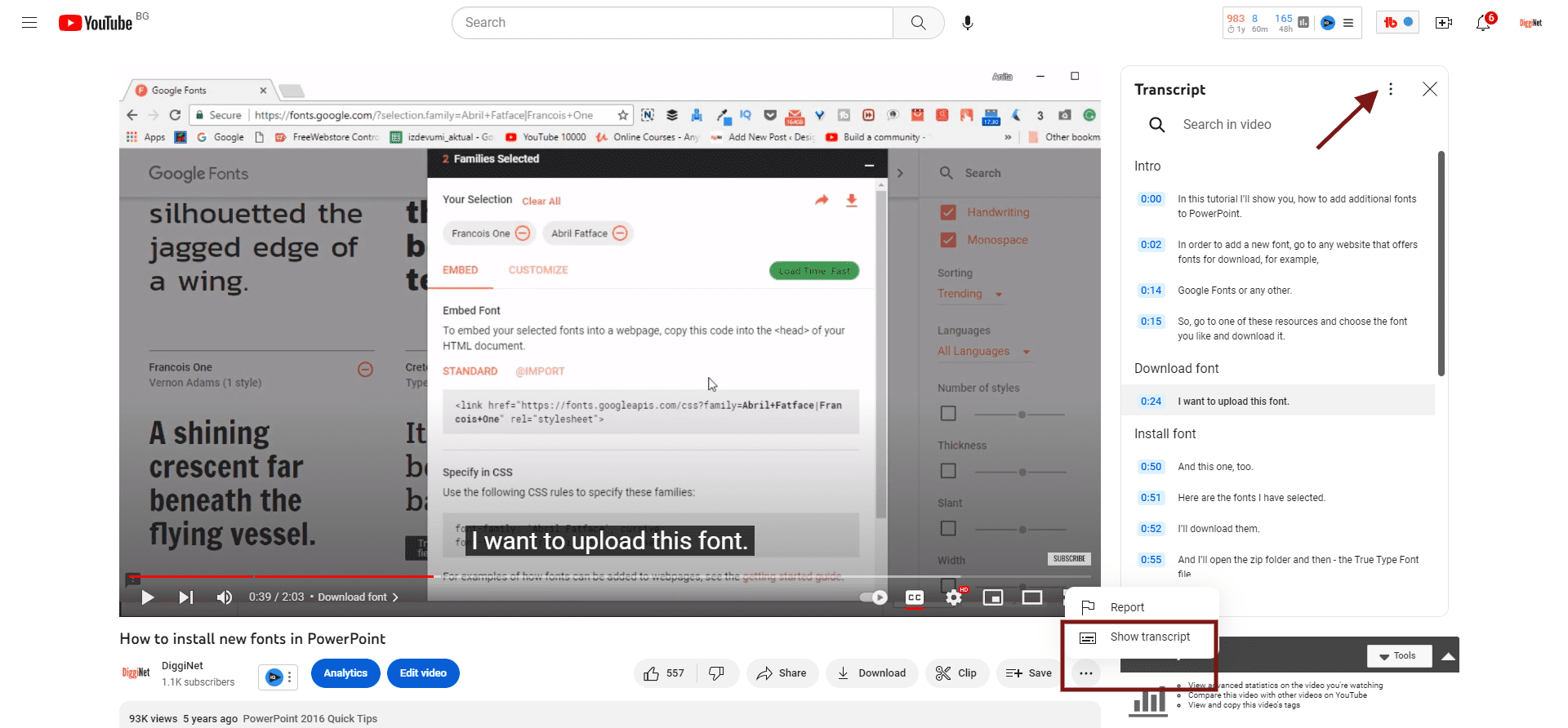
Find a YouTube Video Transcript
No transcript available? Use Speechify or similar tools to generate one from the audio.
The transcript will be messy. Expect repeated words, missing punctuation, and awkward phrasing. That’s normal — ChatGPT will clean it up.
Step 2: Using ChatGPT
Don’t just paste the transcript and ask ChatGPT to “make it a blog post.” You’ll get generic content that sounds like AI wrote it.
Instead, be specific about what you want:
1. Clean up the transcript — fix grammar, remove filler words, and organize the content into clear sections
2. Create an engaging introduction that hooks the reader
3. Break the content into logical H2 and H3 headings
4. Add bullet points or numbered lists where appropriate
5. Write a strong conclusion that summarizes key points
6. Keep the original speaker’s tone and main ideas intact
Target length: [specify word count]
Target audience: [describe your readers]
Writing style: [conversational/professional/etc.]
Here’s the transcript:
[paste transcript here]
This approach gives ChatGPT clear instructions while preserving the original content’s value.
Step 3: Refining the Content
The first output won’t be perfect. Read through it and identify what needs work:
- Does the introduction grab attention?
- Are the section headings clear and compelling?
- Is the content easy to scan?
- Does it flow logically from point to point?
Ask ChatGPT for specific improvements:
“Rewrite the introduction to be more engaging” or “Break this long paragraph into shorter ones with subheadings.”
Don’t accept the first draft. Most good blog posts need 2-3 rounds of refinement.
You can also train AI to write more like you. If you have older blog posts, newsletters, or book sections, give ChatGPT a few examples and ask it to analyze your tone, sentence structure, and style. This helps the next draft sound less generic and more consistent with your usual voice. I explain this process in more detail in my guide on making ChatGPT write like you.
Step 4: Editing and Final Touches
AI can structure and clean up content, but it can’t replace your editorial judgment.
Read the entire post aloud. Does it sound natural? Would your audience find this helpful?
Add your own insights. The YouTube video gave you the foundation — now make it yours. Include examples from your experience, additional tips, or resources your readers would find valuable.
Check facts and verify any claims made in the original video. AI doesn’t fact-check — that’s your responsibility.
Convert Your Audio Recordings Into Blog Posts
This same process works for any audio content you create. Record yourself explaining a concept, interview someone knowledgeable, or capture ideas during a walk.
Upload the audio to any transcription service. Many AI tools for writers can handle this automatically.
Follow the same ChatGPT process: clean transcript, organize content, refine structure, add your voice.
You’ve just turned one piece of content into multiple formats. The YouTube video becomes a blog post. The blog post could become an email newsletter or social media series.
That’s content multiplication — not content creation from scratch.