You hit publish on another blog post. You close a research tab. You save a new manuscript version with today’s date.
Each file lands somewhere — probably Google Drive, maybe Notion, sometimes both.
Three months later, you need that interview transcript. Or the breakdown of your reader feedback. Or the working outline you scrapped but now want back.
You can’t find it.
This isn’t a file management problem. It’s a knowledge management problem — and if you’re writing multiple books, articles, or courses, an AI knowledge base can stop you from losing the work that matters most.
What Is an AI Knowledge Base for Authors
An AI knowledge base is a centralized system where you store manuscripts, research notes, interview transcripts, reader feedback, and reference material — then use AI to search, summarize, and surface what you need when you need it.
It’s not just a folder full of files.
It’s a system that lets you ask questions and get answers pulled directly from your own content.
What did my beta readers say about Chapter 3?
Which interview mentioned the statistic about productivity tools?
What angle did I use for my first book on time management?
Tools like NotebookLM, Claude Projects, and Obsidian with AI plugins turn static notes into searchable, queryable systems.
They don’t write the book for you. They help you remember what you already know.
Why Authors Need a Knowledge Base
Most writers don’t lose content because they’re careless. They lose it because their tools don’t scale with their workload.
Here’s what happens without a system:
- You rewrite the same intro three times because you forgot you already nailed it in version two
- You can’t remember which podcast guest said what — so you re-listen to hours of audio
- You duplicate research because you forgot you already pulled that study
- You lose track of reader feedback buried across emails, DMs, and Amazon reviews
A knowledge base fixes this by centralizing everything and letting AI do the searching for you.
Instead of scrolling through dozens of docs, you ask: What did Sarah say about Chapter 5?
The AI pulls the exact quote.
This matters more if you’re writing multiple books, running a newsletter, or turning blog content into a book. The more you produce, the more you need a system that tracks what you’ve already created.
What You Can Store in Your Knowledge Base
- Manuscript drafts and chapter versions
- Interview transcripts and recordings
- Research PDFs, articles, and source material
- Reader feedback from beta readers, reviews, or emails
- Workshop notes, course outlines, and teaching material
- Blog posts and newsletter archives
- Brainstorm sessions and discarded ideas
The goal isn’t to hoard everything. It’s to keep what you might reference again — and make it searchable.
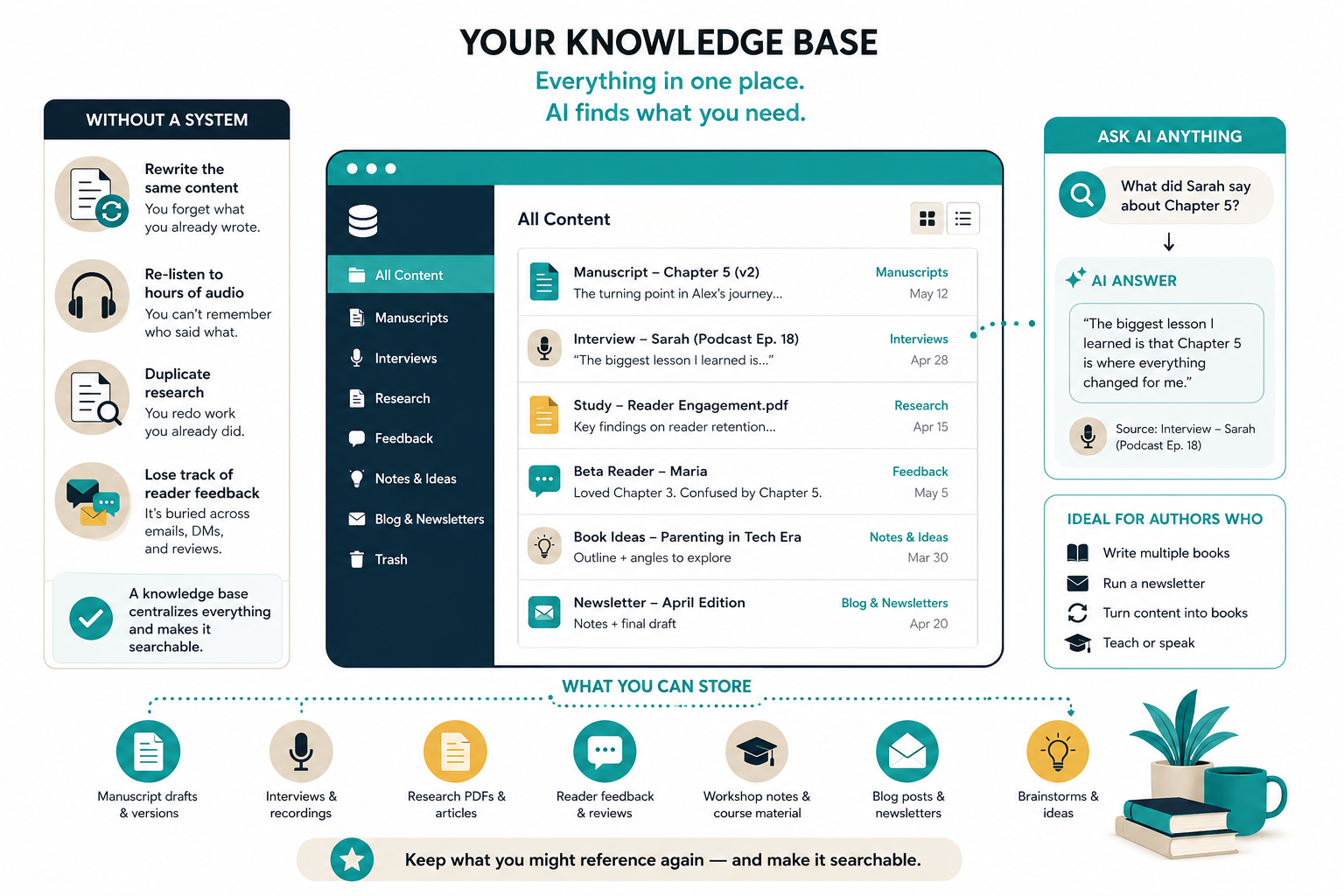
AI knowledge base for authors - example
Best Tools to Build an AI Knowledge Base

You don’t need a complicated setup. Most authors benefit from one or two tools that fit their workflow.
Here’s what works.
NotebookLM
Google’s NotebookLM is built for research-heavy writers. You upload PDFs, docs, and transcripts — then ask questions and get answers sourced directly from your files.
It’s free, requires no technical setup, and works particularly well if you’re synthesizing research from multiple sources.
You can also generate AI-powered study guides, FAQs, and summaries based on your uploaded content.
Best for: Authors who need to pull quotes, track themes across interviews, or summarize research documents.
Claude Projects
Claude Projects lets you create separate workspaces for each book, blog series, or project. You can upload research files, paste interview transcripts, and build custom instructions so the AI responds in your style.
Claude handles long context windows — which means you can upload an entire manuscript draft and ask for structural feedback without losing coherence.
It’s especially useful if you’re working on multiple books at once and need to keep context separate.
Best for: Authors juggling multiple projects who need AI that remembers project-specific context across sessions.
Obsidian with AI Plugins
Obsidian is a note-taking app that stores everything locally in markdown files. With plugins like Smart Connections or Text Generator, you can turn it into an AI-powered knowledge base.
You write your notes. Obsidian links them. AI helps you find patterns, surface related ideas, and generate summaries.
It’s overkill if you just need basic search. But if you’re building a long-term reference library, it’s worth the setup time.
Best for: Writers who want full control over their data and prefer a local-first, interconnected note system.
| Tool | Best For | Cost |
|---|---|---|
| NotebookLM | Research synthesis and source-based answers | Free |
| Claude Projects | Multi-project management with long context | $20/month (Pro) |
| Obsidian + AI | Local knowledge base with linking and AI search | Free + plugin costs vary |
How to Organize Your AI Knowledge Base
The structure doesn’t matter as much as consistency.
Pick a system. Stick with it. Adjust when it breaks.
Here’s a simple structure that works for most authors:
- Projects: One folder per book, course, or major project
- Research: PDFs, articles, studies, and reference material
- Interviews: Transcripts, audio notes, and key quotes
- Feedback: Beta reader comments, Amazon reviews, reader emails
- Drafts: Manuscript versions, chapter outlines, and rewrites
- Ideas: Brainstorms, discarded angles, and future topics
Inside each folder, add a quick note at the top explaining what’s inside and when you last updated it.
This helps when you come back six months later and can’t remember why you saved something.
Naming Conventions That Actually Work
Don’t overthink this. But do be consistent.
Use dates in reverse order: YYYY-MM-DD. This keeps files sorted chronologically.
Example: 2025-03-15-manuscript-draft-v3.docx
Add descriptive tags if you’re storing interviews or research: 2025-03-10-interview-sarah-productivity-expert.txt
The goal is to find the file without opening it.
How to Use AI to Search Your Knowledge Base
Once your files are uploaded, the real value comes from asking the right questions.
Here’s how to get better answers.
Ask Specific Questions
Vague prompts return vague answers.
Don’t ask: What did my beta readers say?
Ask: What feedback did beta readers give on the pacing of Chapter 3?
The more specific your question, the better the AI can narrow down the response.
Request Source Citations
Tell the AI to cite where it found the information.
Example prompt:
Summarize the key objections my readers had about the book’s structure. Include the source file for each point.
This prevents the AI from blending multiple sources into one generic answer — and lets you verify what it says.
Use AI to Find Themes Across Files
If you’ve conducted multiple interviews or collected reader feedback over time, ask the AI to identify patterns.
Example:
What are the top three recurring themes in my beta reader feedback?
This is where AI shines. It can synthesize dozens of documents faster than you can skim them manually.
Prompt for synthesizing feedback:
“I’ve uploaded [number] files of reader feedback, beta reader comments, and Amazon reviews for my book on [topic]. Analyze all the feedback and identify:
1. The top 3 recurring themes or concerns
2. The most commonly praised sections
3. The most criticized sections
For each point, cite which file or source the feedback came from.”
Turning Your Blog Into a Book Using Your Knowledge Base
If you’ve been blogging for a while, you already have the raw material for a book.
The problem is finding it.
An AI knowledge base solves this by letting you query your archive and identify patterns you didn’t see before.
Upload all your blog posts. Then ask:
- What topics do I cover most often?
- Which posts could be grouped into a cohesive chapter?
You can also use tools like Designrr to pull blog posts into a formatted ebook draft — then refine it using AI.
This approach works especially well for nonfiction authors building books around expertise they’ve already shared publicly.
For more on this workflow, see how to build a content calendar that helps you turn a blog into a book.
Using Your Knowledge Base to Research Your Next Book
Before you start writing, your knowledge base can help you validate your book idea.
If you’ve been tracking reader questions, podcast interviews, or workshop feedback, you already know what your audience struggles with.
Ask your AI:
- What questions do my readers ask most often?
- What topics came up repeatedly in my interviews?
- What gaps exist in my previous content that I haven’t addressed yet?
This helps you write books based on real demand — not guesses.
For deeper book topic research, check out how to find a profitable niche for your nonfiction book and explore tools in the AI Tools Directory.
Common Mistakes When Building an AI Knowledge Base
Most authors start strong and then abandon the system.
Here’s what breaks down.
Uploading Everything Without Structure
You don’t need to upload every draft, every email, every random note.
Only upload content you’ll actually reference.
If you’re not sure, ask yourself: Would I search for this in six months?
Not Updating Your Knowledge Base Regularly
A knowledge base only works if it’s current.
Set a monthly reminder to upload new research, interviews, and feedback.
If you wait too long, the backlog becomes overwhelming and you stop using it.
Relying on AI Without Verifying Sources
AI can summarize and surface information — but it can also misinterpret context or blend multiple sources incorrectly.
Always check the original file before using AI-generated summaries in your final manuscript.
How to Maintain Your Knowledge Base Long-Term
The best system is the one you’ll actually use six months from now.
Here’s how to keep it running.
Set a Monthly Review Habit
Once a month, spend 15 minutes uploading new files and pruning outdated ones.
Delete drafts you won’t reference. Archive finished projects. Keep only what’s active or useful.
Use Templates for Recurring Content
If you conduct regular interviews or collect feedback, create a standard template.
Example:
Interview with [Name] — [Date]
Key Points:
Quotes to Use:
Follow-Up Questions:
This makes uploads faster and keeps formatting consistent.
Link Your Knowledge Base to Your Writing Workflow
If your knowledge base lives in a separate app you never open, you’ll stop using it.
Integrate it into your daily workflow:
- Keep a shortcut to your knowledge base tool in your browser bookmarks
- Add a weekly task to upload new research or feedback
- Start each writing session by checking your knowledge base for relevant material
The easier it is to access, the more likely you’ll keep it updated.
AI Knowledge Base vs Traditional Notes
Traditional note-taking apps store information. AI knowledge bases let you interrogate it.
Here’s the difference.
If you only write one book every few years, traditional notes are fine.
If you’re producing multiple books, courses, or content series — an AI knowledge base saves hours of manual searching.
What to Do Next
Pick one tool. Start small.
Upload your last three manuscript drafts. Add your most recent interview transcripts. Drop in any reader feedback you’ve saved.
Then ask one question.
See what the AI surfaces.
If it saves you even 10 minutes of searching, it’s worth building out further.
For more on organizing your research workflow, see Google NotebookLM for Authors and explore the full AI Tools Directory.