You open ChatGPT and wonder if there’s something better out there. Something more tailored to your specific writing needs.
Enter custom GPTs — personalized AI assistants that can understand your voice, remember your preferences, and handle tasks the way you actually work.
But what exactly separates custom GPT vs ChatGPT? And more importantly, which one will actually help you write better?
What Makes Custom GPTs Different
ChatGPT is like a Swiss Army knife — useful for everything, perfect for nothing specific. It responds to whatever you throw at it with general knowledge and a neutral tone.
Custom GPTs are more like specialized tools. Built on the same foundation as ChatGPT, but customized with instructions, uploaded materials, and settings tailored to specific tasks, voices, or industries.
Here’s the difference: ChatGPT knows about writing in general. A custom GPT can be configured to better understand your writing style, preferences, and reference materials.
The key distinction isn’t just what they can do — it’s how they do it.
How Custom GPTs Handle Your Specific Needs
ChatGPT treats every conversation like meeting someone new. Custom GPTs can retain predefined instructions, uploaded materials, and conversation context to create more consistent results.
Say you’re writing a business book. ChatGPT will give you general business advice. A custom GPT configured with your industry information can reference your specific methodology, use your preferred examples, and write in your established tone.
Custom GPTs can also access your own materials. Upload your style guide, previous chapters, or research notes, and the AI will reference them consistently.
That’s not just convenience — it’s continuity.
Customization: Beyond Basic Prompting
With ChatGPT, you’re constantly explaining what you want. “Write in a conversational tone.” “Keep it under 500 words.” “Focus on practical tips.”
Custom GPTs can have these preferences built in.
You can set specific behaviors: always ask clarifying questions before writing, include relevant examples, maintain a particular reading level. The AI follows the instructions, examples, and preferences you provide, allowing it to align more closely with the way you work.
Tone and Voice Consistency
ChatGPT’s default voice is helpful but generic. Custom GPTs can be trained to match your specific voice — whether that’s conversational and warm, direct and analytical, or quirky and engaging.
This matters more than most people realize. Readers notice when your writing voice changes mid-book.
Task-Specific Knowledge
A custom GPT for cookbook authors might know standard recipe formatting, common cooking terms, and dietary restrictions. A custom GPT for business writers might understand frameworks like OKRs, customer journey mapping, or lean startup methodology.
ChatGPT knows about these things too — but it won’t prioritize them or use them consistently unless you specify every time.
Integration and Workflow Benefits
Some custom GPTs can be connected to external tools and services through integrations or APIs, depending on the platform and setup.
Imagine an AI that can pull from your content management system, update your project tracker, or automatically format your manuscript according to your publisher’s guidelines.
ChatGPT lives in its own interface. Custom GPTs can live in your actual workflow.
| Feature | ChatGPT | Custom GPT |
|---|---|---|
| Context & Instructions | New conversation each time | Can retain predefined instructions and reference materials |
| Specialized Knowledge | General knowledge base | Can include your specific materials |
| Tone Consistency | Generic helpful tone | Configured to reflect your voice and style |
| Workflow Integration | Standalone tool | Can connect to your other tools |
| Setup Required | None | Initial configuration needed |
Getting Started with Custom GPTs
You don’t need coding skills to create or use custom GPTs. Most platforms make it point-and-click simple.
Finding Existing Custom GPTs
Start by exploring what’s already available. In ChatGPT, look for the “Explore GPTs” option in the left-side menu. You’ll find custom GPTs for specific writing tasks — from grant writing to social media content.
Try a few that match your needs. See how they handle your typical requests differently than standard ChatGPT.
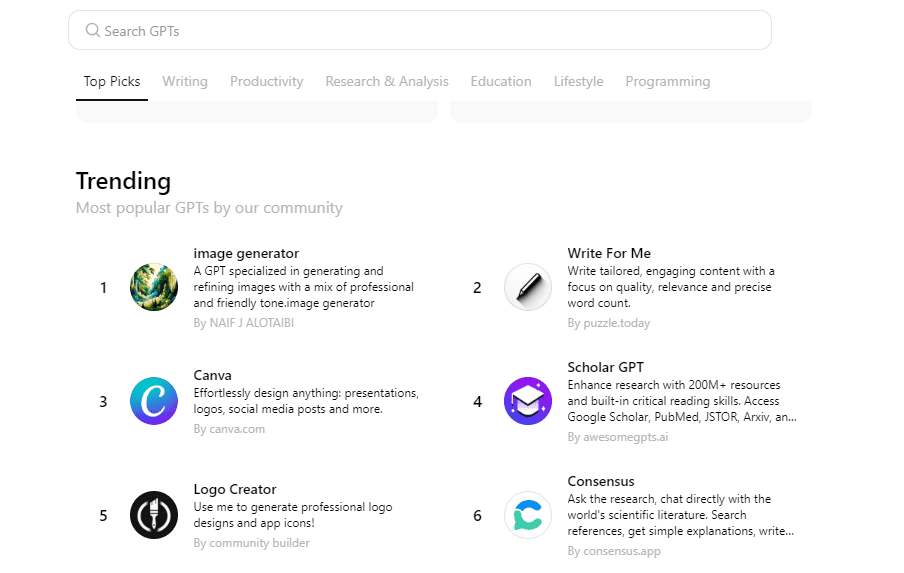
Explore existing GTPs
Creating Your Own Custom GPT
If existing options don’t fit your writing process, you can create your own writing-focused Custom GPT. Go to the Explore GPTs section and click the Create button in the upper-right corner. This opens the GPT builder, where you can customize an AI assistant specifically for the way you write.
The setup process is straightforward. Add instructions that define how you want it to behave, upload writing samples, previous chapters, style guides, or research materials, and describe your preferred tone and audience. You can also set rules such as always ask clarifying questions first, write in a conversational tone, or include practical examples in every section.
The goal isn’t to build an AI that writes books for you. It’s to build an assistant that understands your process and reduces repetitive work while helping you stay consistent.
Start small instead of trying to make one GPT do everything. Give it one focused job first:
- Help me create chapter outlines
- Rewrite rough drafts for clarity
- Turn notes into structured sections
- Suggest transitions between chapters
- Edit content to match my writing style
Once it performs that task well, you can gradually expand its role. A focused writing GPT usually works better than a general-purpose assistant trying to handle every part of the book-writing process at once.
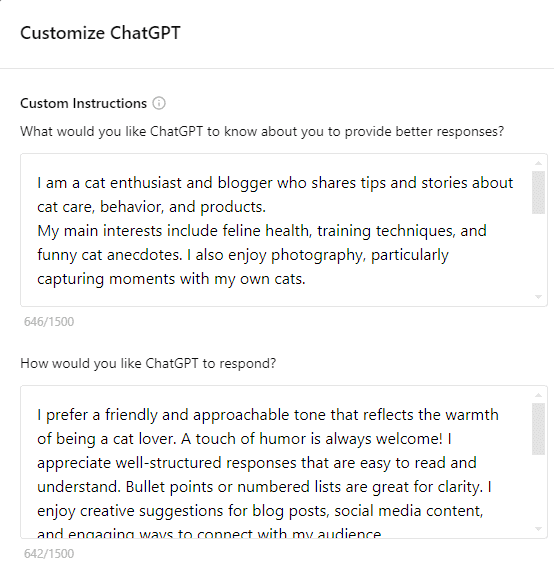
Customize Your ChatGPT
When Custom GPTs Actually Matter
Custom GPTs aren’t always worth the setup time. For one-off tasks or experimenting with AI writing, ChatGPT is fine.
But custom GPTs become valuable when you’re working on longer projects, need consistent voice across multiple pieces, or have specific industry knowledge requirements.
Book Projects
Writing a book means maintaining voice and style across thousands of words. A custom GPT configured with your first chapters and writing samples can help maintain consistency in later sections.
Series or Franchise Writing
If you’re writing multiple books in the same series, business guides for the same industry, or content for the same brand, custom GPTs can maintain continuity automatically.
Technical or Specialized Content
Writing about complex subjects requires accurate terminology and appropriate context. Custom GPTs can be configured with materials and references from your specific field.
The Learning Curve Reality
Custom GPTs improve through updates to their instructions, examples, and uploaded materials. This means providing feedback, correcting mistakes, and gradually refining their understanding of what you want. It’s not automatic.
Think of it like setting up and refining a writing assistant. The clearer your instructions and examples, the more consistent the results become.
Common Setup Mistakes
Most people try to make their custom GPT do too much at once. They want it to research, outline, write, and edit — all perfectly from day one.
Start with one specific task. Get that working well. Then expand.
Also, be specific about what you don’t want. Custom GPTs can pick up unwanted patterns just as easily as good ones.
Cost and Access Considerations
ChatGPT Plus gives you access to custom GPTs, but creating sophisticated ones often requires additional tools or services.
Some platforms offer custom GPT creation for free with limitations. Others charge monthly fees for advanced features like API access or large knowledge bases.
Consider the cost against your time savings. If a custom GPT saves you 30 minutes per writing session, the monthly fee pays for itself quickly.
Making the Choice: Custom GPT vs ChatGPT
The decision comes down to your writing patterns and needs.
Stick with ChatGPT if you write about different topics frequently, prefer maximum flexibility, or only use AI occasionally.
Consider custom GPTs if you’re working on long-term projects, need consistent voice across multiple pieces, or write in specialized fields that benefit from domain-specific knowledge.
You don’t have to choose one forever. Many writers use both — ChatGPT for brainstorming and exploration, custom GPTs for focused production work.
“You are a writing assistant specialized for [YOUR NICHE – e.g., business books, health guides, fiction]. Your role is to help with [SPECIFIC TASK – e.g., chapter outlines, content editing, research summaries].
Writing style: [DESCRIBE YOUR PREFERRED TONE – e.g., conversational but authoritative, direct and practical, warm and encouraging]
Always:
– [SPECIFIC BEHAVIOR 1 – e.g., Ask clarifying questions before starting]
– [SPECIFIC BEHAVIOR 2 – e.g., Provide examples with every concept]
– [SPECIFIC BEHAVIOR 3 – e.g., Keep paragraphs under 3 sentences]
Never:
– [WHAT TO AVOID 1 – e.g., Use jargon without explanation]
– [WHAT TO AVOID 2 – e.g., Write in passive voice]
– [WHAT TO AVOID 3 – e.g., Make claims without context]
When I share my writing, focus on [PRIORITY AREAS – e.g., clarity and flow, factual accuracy, audience engagement].”
Custom GPTs represent the next step in AI-assisted writing — but they’re tools, not magic solutions.
The best custom GPT still requires good input, clear direction, and human oversight. What it offers is consistency and context that ChatGPT can’t match.
For writers serious about using AI as a long-term writing partner, custom GPTs are worth exploring. For occasional use or experimentation, ChatGPT remains the better choice.
The future of AI writing isn’t about replacing human creativity — it’s about creating AI partners that understand how you work and help you do it better.