
You’ve built a prompt library. Hundreds of saved prompts for every stage of your book — outlining, drafting, editing, marketing.
You open ChatGPT or Claude, paste one in, and hit enter.
The output is fine. Polished. Generic.
It doesn’t sound like you. It doesn’t remember what you told it three conversations ago. It doesn’t know your book’s structure, your reader’s pain points, or the examples you’ve been collecting for weeks.
You tweak the prompt. Add more instructions. Paste in previous context. The output improves — but you’re doing this every single time.
That’s the problem with prompt engineering. It assumes every conversation starts from zero.
Context engineering fixes that.
What Context Engineering Actually Means
Context engineering isn’t about writing better prompts. It’s about building reusable AI workspaces that already know what you’re working on.
Instead of writing instructions every time, you give the AI persistent memory: uploaded documents, stored examples, saved instructions, project settings.
Then you interact with it — not as a one-off question-and-answer tool, but as a workspace that remembers.
Here’s what that looks like in practice:
- You upload your book outline once. The AI references it in every conversation.
- You paste three writing samples. The AI mimics your style without being told.
- You define your reader persona. The AI writes with that person in mind — automatically.
- You save instructions for tone, structure, and format. They apply to everything you generate.
This is context engineering. You’re not writing prompts anymore — you’re designing systems.
Why Prompt Engineering Stops Working
Prompt engineering works when you need a quick answer. A single output. A one-time task.
It breaks down when you’re writing a book.
Books require consistency. Your AI needs to remember the framework you’re using. The metaphors you’ve introduced. The reader objections you’re addressing chapter by chapter.
If you’re pasting context into every prompt, you’re not scaling. You’re manually rebuilding the same workspace over and over.
That’s inefficient. And it’s why so many authors abandon AI halfway through a manuscript.
The Core Elements of Context Engineering
Context engineering has five core components. Each one reduces repetition and improves output quality.
Projects
A project is a container. Everything related to your book lives inside it.
In Claude, you create a Project and add relevant files — your outline, writing samples, reader research, chapter notes. Every conversation inside that Project has access to those files.
In ChatGPT, you can use Custom GPTs to simulate this. You upload documents during setup, and every chat with that GPT references them.
The result: you don’t have to re-explain your book every time. The AI already has it.
To make your workflow even more consistent, create reusable book writing skills or custom instructions that match your preferred writing style, tone, structure, and formatting. Include details such as your target audience, chapter layout, formatting preferences, and common terminology. By combining these instructions with your project files, the AI can produce content that stays consistent across every chapter and requires far less editing.
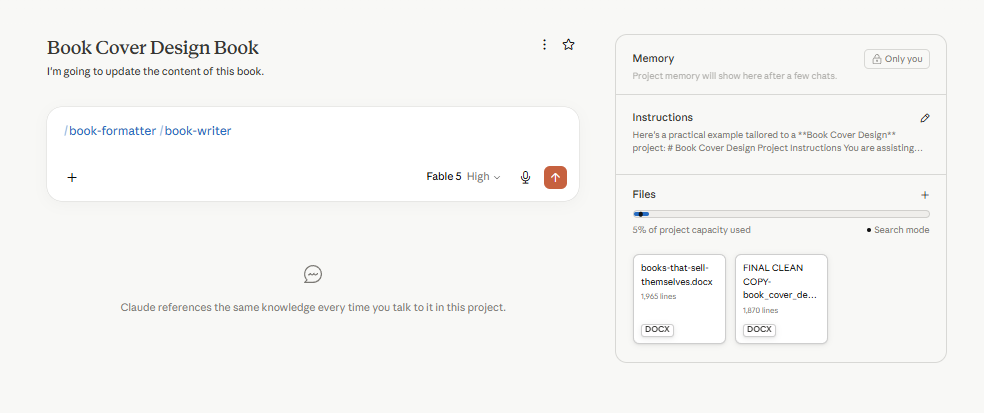
Claude project for authors - example
Memory
Memory stores facts across conversations. It’s dynamic — the AI updates it as you work.
You tell it once: “My reader is a first-time self-publisher who’s intimidated by Amazon KDP.” It remembers.
You clarify: “I want a conversational tone — not academic.” It adjusts.
You define: “Chapter 3 is about book pricing strategy.” It knows where you are in the manuscript.
This works especially well with ChatGPT’s Memory feature. Claude also supports memory, but its strengths are slightly different. Claude can remember information across conversations (if Memory is enabled) and maintains separate memory for each Project, making it particularly useful for long-term writing projects.
Uploaded Documents
Upload your manuscript draft. Your research notes. Your competitor analysis. Your voice samples.
The AI reads them — and references them without being prompted.
This is critical for nonfiction authors. If you’ve compiled reader reviews from Amazon KDP, upload them. The AI will write to those pain points.
If you’ve outlined your book in Scrivener, export it as a text file and upload it. The AI will stay aligned with your structure.
Examples
Examples teach the AI what “good” looks like for you.
Paste three paragraphs you’ve written. The AI mimics your rhythm, sentence structure, and word choice.
Show it a chapter intro you like. It writes similar intros for the rest of your book.
Give it a list of metaphors you use. It weaves them into new drafts.
This is the fastest way to make AI output sound like you — not a polished corporate bot.
Instructions
Instructions are your rulebook. Tone, structure, style, constraints.
They live at the Project level — so they apply to every conversation inside that Project.
Example:
- “Write short paragraphs. Never more than three sentences.”
- “Use em-dashes for pauses — not commas.”
- “Avoid hype words: revolutionary, game-changer, unleash.”
- “Start every section with the reader’s problem — not the solution.”
Once these are set, the AI follows them automatically. You’re not rewriting instructions in every prompt.
How to Build a Context-Rich AI Workspace
Here’s how to set up a workspace for your book in Claude or ChatGPT.
Step 1: Create a Dedicated Project or Custom GPT
In Claude: Create a new Project. Name it after your book. This is your workspace.
In ChatGPT: Create a Custom GPT. Add a name and description that reflects your book’s topic and audience.
Step 2: Upload Core Documents
Start with these:
- Your book outline or table of contents
- 3-5 writing samples from your blog, articles, or previous chapters
- Reader research — pain points, objections, questions
- Any frameworks, models, or processes you’re teaching
Don’t upload everything. Upload what the AI needs to stay aligned with your voice and structure.
Step 3: Write Your Instructions
Add a custom instruction block. Include:
- Your reader persona
- Tone and style rules
- Structural preferences (paragraph length, heading style)
- Words or phrases to avoid
- Examples of good vs. bad output
This becomes the rulebook. The AI references it in every conversation.
Step 4: Feed the AI Examples as You Go
Every time you write a paragraph you like, paste it into the Project. Tell the AI: “This is my voice. Match this.”
Every time you draft a chapter intro, add it. The AI learns your patterns.
This is iterative. You’re not building the perfect workspace on day one — you’re refining it as you write.
Step 5: Use the Workspace Consistently
Work inside the same Project or Custom GPT for the entire book. Don’t jump between random ChatGPT chats.
The more you use it, the better it gets. The AI learns what you mean by “conversational” or “clear” or “direct.” It adjusts.
That’s the power of context: it compounds.
Context Engineering for Different Book Stages
Context engineering isn’t a one-size-fits-all process. You build different workspaces for different stages of your book.
Research & Planning
Upload competitor books. Amazon reviews. Reader questions from forums or social media.
The AI analyzes patterns and suggests chapter topics, reader objections, and content gaps.
Instructions: “Identify recurring pain points in these reviews. Suggest chapter topics that address them.”
Outlining
Upload your research findings. Add your framework or teaching method.
The AI drafts a table of contents, suggests chapter sequences, and maps examples to concepts.
Instructions: “Structure this book for a beginner. Start every chapter with a problem, then explain the solution.”
Drafting
Upload your outline. Add writing samples. Define your voice rules.
The AI drafts sections — but in your style, referencing your structure, staying aligned with your examples.
Instructions: “Draft this section using short paragraphs, conversational tone, and real-world examples. Reference Chapter 2’s framework.”
Editing
Upload your full draft. Add readability rules. Specify tone adjustments.
The AI tightens sentences, removes jargon, and flags inconsistencies.
Instructions: “Edit for clarity. Remove passive voice. Flag sentences longer than 25 words.”
Marketing
Upload your manuscript. Add reader persona details. Include your book’s core promise.
The AI writes book descriptions, social posts, email sequences, and ad copy — all aligned with your book’s message.
Instructions: “Write a 150-word Amazon book description. Lead with the reader’s problem. Use conversational tone.”
Context Engineering vs. Prompt Engineering: A Comparison

Prompt engineering is fast. Context engineering is scalable.
If you’re writing a single chapter, prompt engineering is fine. If you’re writing a 40,000-word book, context engineering saves hours.
Common Mistakes in Context Engineering
Context engineering works — but only if you build the workspace correctly. Here’s what breaks it.
Uploading Too Much
Don’t upload your entire Kindle library. The AI can’t process 200,000 words effectively.
Upload what’s relevant: your outline, your voice samples, your reader research. Keep it focused.
Not Updating Instructions
Your instructions aren’t set-and-forget. As you draft, your style evolves. Your tone shifts.
Update your instructions every few chapters. Add new examples. Refine your rules.
Skipping Examples
Instructions tell the AI what to do. Examples show the AI how to do it.
If your output sounds generic, you probably haven’t fed the AI enough examples.
Jumping Between Workspaces
If you work in a new ChatGPT chat every day, you lose context. The AI starts from zero every time.
Stay inside one Project or Custom GPT for the entire book. Consistency matters.
Tools That Support Context Engineering
Not every AI tool supports context engineering. Here’s what works.
Claude Projects (Pro Plan)
Best for: Authors who want document uploads, persistent instructions, and clean conversation threads.
You create a Project, upload files, add instructions, and work inside that workspace. Every conversation references your uploaded context.
ChatGPT Custom GPTs (Plus or Pro Plan)
Best for: Authors who want reusable AI assistants with pre-loaded documents and instructions.
You build a Custom GPT, upload files during setup, and define behavior. Anyone using that GPT works with your pre-set context.
NotebookLM (Free)
Best for: Authors who want research-heavy context — especially for nonfiction.
Upload research documents, PDFs, notes. The AI summarizes, connects ideas, and answers questions based only on your uploaded content. Learn more in our Google NotebookLM for authors guide.
Scrivener + AI Integrations
Best for: Authors who want to keep their manuscript in Scrivener but still use AI.
Export sections as text files, upload them to Claude or ChatGPT Projects, and work there. You’re not switching tools — you’re connecting them.
| Tool | Best For | Context Features |
|---|---|---|
| Claude Projects | Document-heavy workflows | Upload files, set instructions, persistent workspace |
| ChatGPT Custom GPTs | Reusable AI assistants | Pre-loaded files, defined behavior, shareable |
| NotebookLM | Research synthesis | Upload research, AI-only references your content |
| Scrivener + AI | Manuscript management | Export sections, integrate with AI workspaces |
A Real Workflow: Writing a Chapter with Context Engineering
Here’s how context engineering works in practice — writing one chapter of a nonfiction book.
Step 1: Open your Claude Project. Your outline, voice samples, and reader research are already uploaded.
Step 2: Tell the AI which chapter you’re drafting. Reference the outline. The AI knows where this chapter fits in the book’s structure.
Step 3: Ask for a rough draft. The AI writes using your tone, references your framework, and stays aligned with your examples.
Step 4: Edit the draft yourself. Then paste your edited version back into the Project. Tell the AI: “This is closer to my voice. Match this in the next chapter.”
Step 5: Move to the next chapter. The AI remembers your edits. The next draft is tighter.
That’s the loop. You’re not starting from scratch every time. You’re refining a workspace that improves with every chapter.
When Context Engineering Isn’t Enough
Context engineering solves repetition. It doesn’t solve everything.
If your outline is weak, the AI can’t fix it. If your research is shallow, the AI will produce shallow content.
Context engineering amplifies what you bring to the process. It doesn’t replace original thought, lived experience, or editorial judgment.
It also doesn’t work well for short, disconnected tasks. If you’re writing a single social post, prompt engineering is faster.
Use context engineering when you need consistency across a large project. Use prompt engineering when you need speed on a one-off task.
You are a book writing assistant. I’m working on a nonfiction book titled [Your Book Title]. My reader is [describe your reader persona]. I’ve uploaded my outline, three writing samples, and reader research to this Project.
Your role:
– Reference my outline when drafting chapters
– Match the tone and style in my writing samples
– Address the pain points identified in my reader research
– Write short paragraphs (max 3 sentences)
– Use conversational tone — no corporate jargon
– Avoid hype words: revolutionary, game-changer, unleash
– Start every section with the reader’s problem — not the solution
When I ask you to draft a section, reference the relevant chapter in my outline and write in my voice. When I paste an edited version, learn from my changes and apply them to future drafts.
How to Get Started with Context Engineering
Start small. Pick one book project. Build one workspace.
Create a Claude Project or ChatGPT Custom GPT. Upload your outline, three writing samples, and one research document.
Write one instruction block: tone, structure, reader persona.
Draft one chapter. See how the AI uses your context.
Refine your instructions. Add more examples. Upload more documents as you go.
Context engineering isn’t a one-time setup. It’s a system you build alongside your book.
The more you use it, the better it gets. That’s the shift from prompt engineering to context engineering — from starting over every time to building something that remembers.