
You’ve opened ChatGPT again, typed your request, and gotten back something that sounds… fine. Technically correct. But it doesn’t sound like you.
The words are there, but your voice isn’t. Learning how to make ChatGPT write like you changes that — turning a decent AI assistant into something that actually captures your style.
It’s not magic. It’s method.
Understand Your Writing Style First
Before you can teach ChatGPT to mimic your voice, you need to know what that voice actually sounds like.
Most writers think they know their style. They don’t. Not specifically enough to explain it to an AI.
Take five minutes and analyze a few pieces of your own writing. Look for patterns:
- Do you write in short, punchy sentences or longer, flowing ones?
- Is your tone formal, conversational, or somewhere between?
- Do you ask questions to engage readers or stick to statements?
- How often do you use humor, metaphors, or personal anecdotes?
- Do you prefer active or passive voice?
Write down what you find. These patterns become your blueprint.
Feed ChatGPT Examples of Your Writing
ChatGPT can use the examples you provide to imitate patterns in tone, structure, and writing style within the conversation. The more specific examples you provide, the better it gets at matching your style.
Don’t just tell it “write like me.” Show it what that means.
Paste a paragraph or two of your actual writing into the chat, then say: “This is how I write. Please match this tone and style for the following content.”
Be selective about your examples. CChoose pieces that best represent the voice you want ChatGPT to mimic or reflect — not your experimental writing or off-brand content.
Give Clear, Detailed Instructions
Vague prompts get vague results. “Write in my style” means nothing to an AI. “Write with short sentences, casual tone, and ask one question per paragraph” gives it something to work with.
Break down your style into specific elements:
- Tone: “Keep it friendly but professional, like explaining something to a colleague”
- Sentence structure: “Mix short, direct sentences with occasional longer ones for rhythm”
- Vocabulary: “Use simple language, avoid jargon, include contractions”
- Personality: “Add slight skepticism, be honest about tradeoffs”
The more detailed you get, the closer ChatGPT comes to your actual voice.
Use Custom GPTs to Write Like You
If repeating the same instructions in every conversation starts feeling repetitive, a Custom GPT can help. Unlike general ChatGPT, which responds based on the current conversation, a Custom GPT lets you build a writing assistant with predefined instructions, preferences, and reference materials tailored to your workflow. If you want a deeper breakdown, read our article on the difference between ChatGPT and Custom GPTs.
If existing options don’t fit your needs, you can create your own writing-focused GPT. Go to the Explore GPTs section and click the Create button in the upper-right corner. This opens the GPT builder, where you can customize an assistant specifically for the way you write.
Start by telling it who you are and what you write.
What would you like ChatGPT to know about you?
Include details such as your profession, audience, goals, and content type.
Example:
“I’m a nonfiction author writing practical guides for busy professionals. My readers want clear, actionable advice with real-world examples.”
Then define how you want it to communicate.
How would you like ChatGPT to respond?
Describe your writing style and preferences.
Example:
“Write in a conversational but authoritative tone. Use short paragraphs, active voice, and specific examples. Avoid corporate jargon and motivational fluff.”
You can take it further by uploading writing samples, previous chapters, style guides, or research notes. This gives your GPT more context and helps create more consistent results across blog posts, books, emails, and other content.
The goal isn’t to create an AI that replaces your writing. It’s to build an assistant that already understands your style, so you spend less time repeating instructions and more time refining ideas.
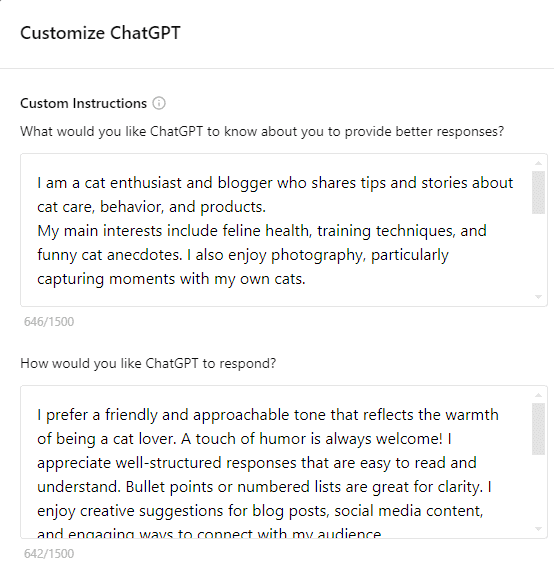
Customize Your ChatGPT
Refine Through Feedback
The first result probably won’t sound exactly like you — and that’s normal. Use early interactions to identify patterns in what feels right and what doesn’t.
If you find yourself repeating the same corrections, don’t keep fixing them inside the chat. Move them into your Custom GPT instructions so they become part of the default behavior.
For example, instead of repeatedly writing:
- “Make the sentences shorter and more direct”
- “Reduce the enthusiasm”
- “Add practical examples”
- “Avoid corporate jargon”
add rules like:
- Use short, direct sentences
- Keep the tone conversational and matter-of-fact
- Include practical examples in every section
- Avoid buzzwords and corporate language
Use the conversation to discover your preferences. Use the instructions to make them repeatable. Over time, you spend less time correcting outputs and more time improving ideas.
Create a Library of Working Prompts
Once you find prompts that consistently produce good results, save them. Building a collection of tested prompts saves time and ensures consistency.
Create templates for different types of content:
- Blog posts: “Write a blog introduction that hooks readers without overpromising, using my conversational but informed tone”
- Social media: “Create a LinkedIn post that shares insight without being preachy, keeping it under 150 words”
- Email newsletters: “Write an email that delivers value upfront, sounds like a friend sharing useful information”
Refine these templates over time as you learn what works best.
Practice with Different Content Types
Your writing voice might vary slightly between a formal report and a casual blog post. Test how to make ChatGPT write like you across different formats.
Try generating:
- Email responses
- Social media captions
- Article outlines
- Product descriptions
- Marketing copy
Note which prompts work best for each format, then adjust your instructions accordingly.
Stay Consistent With Your Guidelines
If you switch between formal and casual instructions too often, ChatGPT gets confused about your actual style. Pick the voice that represents you best for each type of content and stick with it.
Consistent instructions help ChatGPT produce more reliable and predictable results.
Remember: You’re Still the Editor
ChatGPT can match your style, but it can’t replace your judgment or lived experience. Use it as a starting point, not a finished product.
The AI handles the heavy lifting of getting words on the page in your voice. You handle the strategy, fact-checking, and final polish.
That division of labor is where the real efficiency gains happen.
Humanize Your AI-Generated Content
Even when ChatGPT captures your style well, the output can still feel slightly artificial. AI-generated content often lacks the small imperfections and natural flow that make human writing feel authentic.
This matters more than you might think. Google increasingly emphasizes content that demonstrates experience, expertise, authority, and trustworthiness (E-E-A-T), regardless of whether AI assisted in creating it.
Consider using AI humanizer tools to refine your content. These tools adjust phrasing, vary sentence structure, and smooth out the telltale signs of AI generation.
But remember — no tool replaces careful editing and adding your own insights to the content.
Analyze my writing style from the following examples: [paste 2-3 paragraphs of your writing]
Based on this analysis, help me create content that matches my style. When writing responses:
– Use my typical sentence length and structure
– Match my tone and level of formality
– Include similar types of examples or explanations I use
– Mirror my vocabulary choices and any recurring phrases
– Follow my paragraph structure and flow
For this task, write [specific content request] while maintaining these style elements consistently throughout.
Build Your Personal AI Writing System
Learning how to make ChatGPT write like you isn’t a one-time setup. It’s an ongoing process of refinement.
Start with clear examples of your writing. Add specific instructions about tone and structure. Use custom instructions to set defaults. Give feedback to improve results. Save the prompts that work.
Over time, you’ll develop a system where ChatGPT consistently produces content that sounds like you — faster than you could write it yourself, but with your voice intact.
The goal isn’t to replace your writing process. It’s to enhance it.