
If you’re a self-published author, chances are you’ve seen people compare Publisher Rocket vs KDSPY. Both are well-known tools for Amazon keyword research and picking the right categories—but which one actually fits the way you work and helps you make better publishing decisions?
Let’s break it down simply: what each one does, how much they cost, and where they truly help—or fall short.
Quick Comparison
- KDSPY: $69 one-time payment, browser extension. Focuses on Amazon category and competition analysis. Uses a traffic light system to highlight competition levels. Great for quick scans.
- Publisher Rocket: $199 one-time payment, downloadable software. Offers Amazon search volume, keyword difficulty scores, revenue estimates, AMS ad keyword suggestions, and a powerful Reverse ASIN feature.
No subscriptions. One-time payments. Lifetime updates.
What is KDSPY?
KDSPY is a browser extension that adds real-time data to your Amazon browsing experience. With a single click, it shows key details like best-seller rank, estimated monthly sales and revenue, number of reviews, and book pricing across Kindle, paperback, and audiobook formats. It’s designed to help you quickly assess how competitive a category is—and whether it’s worth pursuing.
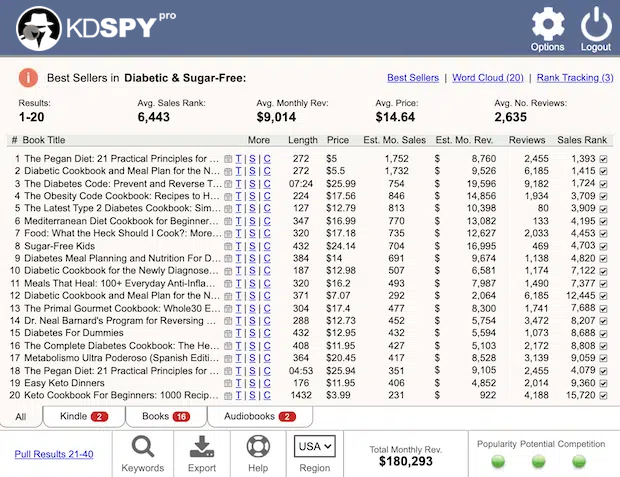
One of KDSPY’s standout features is its traffic light system, which visually highlights market competition: green for low, yellow for moderate, and red for high. You can also run word clouds based on book titles and subtitles to spot recurring keywords, and export all your data for further analysis. While KDSPY doesn’t offer advanced features like Amazon search volume or AMS ad keyword tools, it’s a solid option for quick, browser-based research focused on Amazon’s marketplace. Just keep in mind that its sales estimates are based on best-seller rank and pricing—not direct Amazon data—so use them as a directional guide rather than an exact measurement.
What is Publisher Rocket?
Publisher Rocket is built for deeper, data-driven decisions. You can search by keyword to find Amazon’s monthly search volume, see a competition score from 1 to 100, and get revenue estimates for top-ranking books. It also gives you AMS ad keyword suggestions and full access to every Amazon category (including hidden ones like short reads).
One standout feature is its Reverse ASIN lookup—you can enter the ASIN of a bestselling book, and Rocket will show you all the keywords that book ranks for. This is a powerful way to uncover what’s already working in your niche. If you’re not familiar with how it works, check out this guide to Reverse ASIN for KDP books.
For a detailed walkthrough of all the tool’s features, see this breakdown of how Publisher Rocket works.
Keyword and Category Research
KDSPY is great for scanning Kindle categories fast. You can spot which categories are worth pursuing based on how much the top books are making and how many reviews they’ve earned. You also get keyword suggestions pulled from titles, but without any data on how often those terms are searched.
Publisher Rocket starts with keywords. Enter a single word and you’ll get back a list of related phrases, complete with search volume, competition score, and estimated earnings. It’s a solid tool if you want to build your entire publishing strategy around proven demand. It also handles category research well. You can browse all available Amazon categories, sort them by competition, and understand exactly what it takes to rank in the top 10.
For more on category strategy, this guide to Amazon book categories is worth a look.
Competitor Analysis
KDSPY gives you a snapshot of the top 20 books in any category—sales estimates, number of reviews, average rating, and price. You can also run a word cloud on an author’s backlist to see which terms they use most often. It’s a quick way to get the lay of the land.
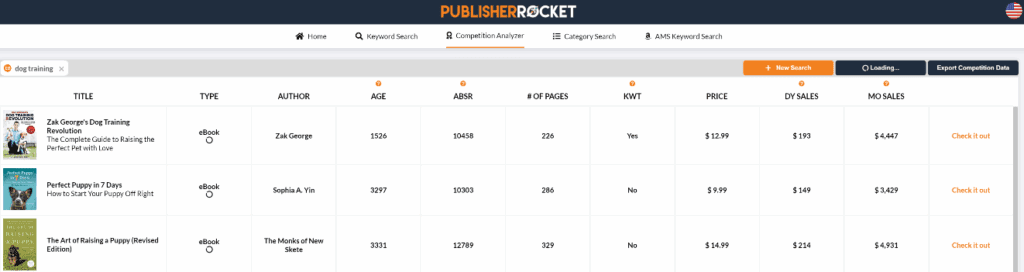
Publisher Rocket’s Competition tab takes it a step further. For any keyword, you get estimated daily and monthly sales, the age of each book, and a competition score. That kind of context can really sharpen your marketing plan. And if you’re exploring niche ideas, the blog post on how to find a book topic on Amazon offers a simple, step-by-step approach to help guide your research.
When you’re comparing Publisher Rocket vs KDSPY for competitor research, it really depends on how deep you want to go. KDSPY gives you a quick overview—perfect if you’re just looking to get a feel for the market. Publisher Rocket goes further, offering more detailed stats that can help shape your game plan. So if you’re deciding between the two, ask yourself: do you need a fast snapshot or a more strategic view?
Ease of Use
KDSPY is about as plug-and-play as it gets. Install the extension, go to Amazon, and click the icon. It loads fast, and the data appears right on the page. It’s simple and intuitive, especially if you’re just browsing ideas.
Publisher Rocket lives on your computer, but it’s equally straightforward. Tabs are clearly labeled, data loads quickly, and even first-time users can navigate it without much of a learning curve. Plus, you don’t have to be online constantly once it’s installed.
Pricing and Refunds
KDSPY is $69 for lifetime access and comes with a 60-day money-back guarantee.
Publisher Rocket is now $199, also with lifetime access and free updates, and it offers a 30-day money-back guarantee. Yes, it’s a bigger upfront investment—but you’re getting much more detailed data.
Publisher Rocket vs KDSPY: Pros and Cons
When you’re weighing Publisher Rocket vs KDSPY, it’s not about which tool is best overall—it’s about which one works best for you. KDSPY is all about speed and simplicity, while Publisher Rocket offers more depth and detailed insights. To help you figure out which one fits your publishing style, here’s a straightforward look at the pros and cons of each.
KDSPY Pros
- Affordable
- Easy to install and use
- Quick category scans
- Works directly on Amazon
- Generous 60-day refund policy
KDSPY Cons
- No search volume data
- No keyword difficulty score
- Fewer features overall
Publisher Rocket Pros
- Includes Amazon search volume and competition scores
- Provides keyword earnings estimates
- Offers AMS keyword suggestions
- Deep category analysis
- Powerful Reverse ASIN tool
Publisher Rocket Cons
- Higher one-time price
- Requires software installation
- Shorter refund window
At the end of the day, choosing between Publisher Rocket vs KDSPY comes down to how you like to work. If you want something quick and easy while browsing Amazon, KDSPY does the job. If you’re building a full publishing plan and want deeper data, Publisher Rocket has more to offer. Whichever one you go with, the real win is using it to make smarter, faster decisions—not just collecting info.