
You’ve written your book — or you’re halfway through — and already the pressure starts. How will you market this thing? Where will all that social media content come from?
Here’s what most authors miss: you don’t need to create marketing content from scratch.
The solution is sitting right in your manuscript. When you repurpose your book into social media content, you’re not just saving time — you’re building a consistent message that actually connects with readers who’ll love your work.
Why Repurpose Your Book for Social Media
Your book contains months of your best thinking. Why start over with social posts?
When you repurpose your book, you’re extracting value from content you’ve already researched, written, and refined. Each chapter holds multiple social media posts. Every case study can become a standalone story.
This approach solves the biggest marketing problem authors face: consistency. You’re not scrambling for content ideas every week. You have a library of material that aligns perfectly with your book’s message.
Plus, this strategy builds anticipation. Readers see your insights on social media and think, “If this is what they share for free, imagine what’s in the book.”
How AI Makes Book Repurposing Faster
Manual repurposing works — but it’s slow. You read through your chapters, pick out quotes, rewrite them for different platforms.
AI changes that process completely.
Tools like Claude or ChatGPT can analyze your book content and suggest social media posts instantly. They can pull quotes, identify key concepts, and even adapt your tone for different platforms.
The AI doesn’t replace your judgment — it accelerates the extraction process. You still decide which content fits your audience and brand.
Start With Your Table of Contents
Your table of contents is a content calendar in disguise.
Each chapter title represents a core concept your audience needs to understand. Turn those into social media themes.
If your business book has a chapter called “The Three-Hour Meeting Trap,” that becomes a week of LinkedIn posts about meeting efficiency. The chapter on “Email Boundaries That Actually Work” feeds into Twitter threads about digital overwhelm.
Look at your subheadings too. They’re often perfect for individual posts or story highlights on Instagram.
This approach keeps your social media aligned with your book’s structure. Readers who follow your content will already understand your framework before they buy.
Pull Quotes That Stand Alone
Not every quote from your book works on social media. The best ones make sense without context.
Look for sentences that complete this test: “If someone saw this quote with no other information, would they understand the point?”
AI can help here. Ask it to identify your most quotable lines — sentences that capture big ideas in simple language.
Strong quotes often start with: “The difference between…” or “Most people think…” or “Here’s what nobody tells you…”
Format matters too. A quote that works on Instagram might be too long for Twitter. Repurpose your book quotes by creating multiple versions — full quote for LinkedIn, shortened version for Twitter, visual quote for Instagram.
Turn Chapters Into Threads or Carousels
Twitter threads and Instagram carousels are perfect formats for chapter summaries.
Take your chapter’s main argument and break it into 5-7 digestible points. Each point becomes a tweet or carousel slide.
Start with the chapter’s core promise: “Here’s why most productivity advice fails (and what works instead).”
Then walk through your supporting points:
– Point 1: The myth everyone believes
– Point 2: Why that myth is harmful
– Point 3: What science actually shows
– Point 4: A better approach
– Point 5: How to implement it today
End with a call-to-action that mentions your book: “This is one framework from my book [Title]. Link in bio for more.”
AI can structure these threads for you. Feed it your chapter and ask for a Twitter thread outline or Instagram carousel sequence.
Repurpose Case Studies and Examples
The stories in your book are social media gold.
Case studies work especially well because they’re self-contained. You don’t need to explain the entire book’s premise — the story makes the point.
If your book includes a case study about a company that increased retention by 40%, that’s a complete LinkedIn post. Add context about why this matters, but the case study does the heavy lifting.
Examples work the same way. The three-sentence example about poor email habits from Chapter 4 becomes a standalone Twitter observation.
Pull out specific numbers, timelines, and outcomes. Social media audiences love concrete details: “In 6 months” hits harder than “eventually.” “$50K savings” is better than “significant cost reduction.”
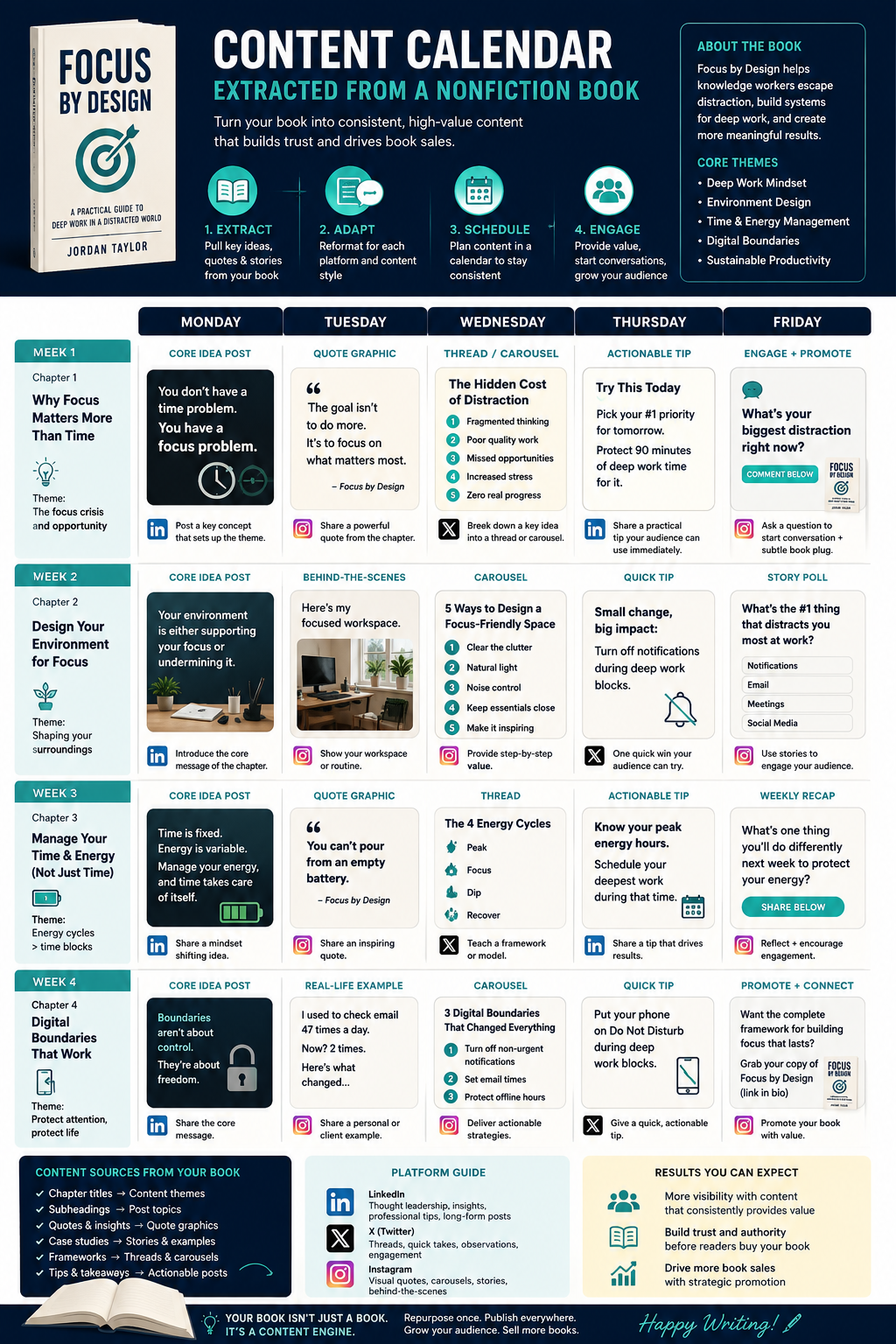
Create a Content Calendar From Your Book
Your book’s logical flow creates a natural content sequence.
Start with foundational concepts from your early chapters. Build toward more advanced ideas. This mirrors how readers will encounter your ideas in the book.
Map out 3 months of content:
– Month 1: Introduction concepts and why the problem matters
– Month 2: Core methodology and framework
– Month 3: Advanced applications and next steps
Within each month, vary your content types. Monday might be a core concept quote. Wednesday could be a case study thread. Friday might be a practical tip from your how-to sections.
This systematic approach means you’re never starting from zero. You know what you’ll post next because you’re following your book’s roadmap.
Building Your Content Library
Once you’ve extracted content from your book, organize it by platform and type.
Create folders for:
– Twitter threads ready to post
– Instagram quotes with suggested imagery
– LinkedIn articles adapted from chapters
– Story highlights pulled from examples
This becomes your content bank. When you need to post but don’t have time to create, you pull from this library.
Turn your book into a content calendar
Keep Your Voice in the Mix
When you repurpose your book content, maintain consistency between your social voice and your book voice.
If your book is conversational, your social content should match. If your book is authoritative and research-heavy, carry that tone into your posts.
AI can help here too — but it needs guidance. Train it with examples of your writing style before asking it to repurpose content.
The goal isn’t to sound like every other author on social media. It’s to sound like you, consistently, across all platforms.
Tools That Help You Repurpose Books Into Social Content
Several AI tools excel at content repurposing for authors.
Copy.ai has templates specifically for turning long-form content into social media posts. You paste in your chapter or section, and it generates multiple post variations.
Jasper offers similar functionality with more control over tone and format. It’s particularly good at maintaining voice consistency across different content types.
For visual content, Canva can turn your quotes into shareable graphics automatically. Their AI suggests layouts based on your text length.
Don’t overlook simpler tools like Claude or ChatGPT. With the right prompts, they can extract social content from your manuscript quickly and effectively.
| Tool | Best For |
|---|---|
| Copy.ai | Quick social media variations |
| Jasper | Voice consistency across platforms |
| Canva | Quote graphics and visual content |
| Claude/ChatGPT | Custom content extraction |
Don’t Wait Until the Book Is Finished
Start repurposing as you write.
Each completed chapter gives you weeks of social media content. You don’t need the full manuscript to begin building your audience.
This approach has a hidden benefit: it tests your ideas. If a concept from Chapter 3 gets strong engagement on LinkedIn, you know that section resonates. If another idea falls flat, consider strengthening it in the book.
Social media becomes market research for your book. You’re not just promoting — you’re validating your content with real readers.
Plus, by the time your book launches, you’ll have built an audience that’s already invested in your ideas. They’ve been following your thinking for months. The book purchase feels natural, not forced.
Extract social media content from this book chapter:
[paste your chapter here]
Create:
1. One compelling quote for Instagram (under 280 characters)
2. A 5-tweet Twitter thread outline with the main points
3. Three LinkedIn post ideas with different angles
4. One case study or example that works as standalone content
Keep my original voice and tone. Focus on actionable insights readers can apply immediately.
Your Book Is Your Content Engine
Most authors think about social media as another task on top of writing. But when you repurpose your book systematically, social media becomes an extension of your writing process.
You’re not creating more work — you’re extracting maximum value from work you’ve already done.
Your book contains hundreds of potential social media posts. The insights that took you months to develop and refine can fuel your marketing for years.
The key is starting this process early and staying systematic about it. Don’t wait until launch week to think about social content. Make repurposing part of your regular writing workflow.
Your future self — the one scrambling for content at 9 PM on Sunday — will thank you.