You’ve finished your book and hit a wall. The manuscript you spent months writing sits complete, but now you need a book description that actually sells.
Writing a compelling blurb feels impossible. Too short and it says nothing. Too long and readers scroll past. Too salesy and it feels fake.
Book description generators can help. They won’t write the perfect blurb — but they can give you a solid starting point to refine.
What Book Description Generators Actually Do
These tools don’t read your entire manuscript and craft a perfect summary. They work with the information you provide — your genre, key plot points, target audience — and generate multiple variations based on successful patterns.
Think of them as brainstorming partners. They help you see your book from different angles and suggest structures you might not consider.
Some focus on specific genres. Others offer general templates. The best ones let you iterate quickly.
Manuscript Report
Manuscript Report’s free Book Blurb Generator gives you three ready-to-use blurb variations — no signup, no upload, no waiting.
You tell it your genre, characters, and core conflict. It generates three different angles: hook-focused, character-driven, and stakes-centered. Pick the one that fits, or mix elements from all three.
It’s built for Amazon KDP, so the output is already formatted for what browsers actually see on a product page. Not a wall of text. Not a summary of your plot. Marketing copy — the kind that makes someone click “Buy.”
Will you edit it? Yes. Your voice is your voice. But you’ll have three solid starting points in under 30 seconds, and you’ll see quickly which angle sells your book best.
MyStoryFlow
MyStoryFlow’s free blurb generator gives you three versions, not one. Put in your title, genre, main character, central conflict, and what’s at stake — and it generates a hook-focused version, a character-driven version, and a situation-based version simultaneously.
Each comes with performance scoring: hook strength, emotional appeal, genre fit. So you’re not just getting copy — you’re getting a read on which angle is working and why. Useful if you’re not sure which version of your story sells best.
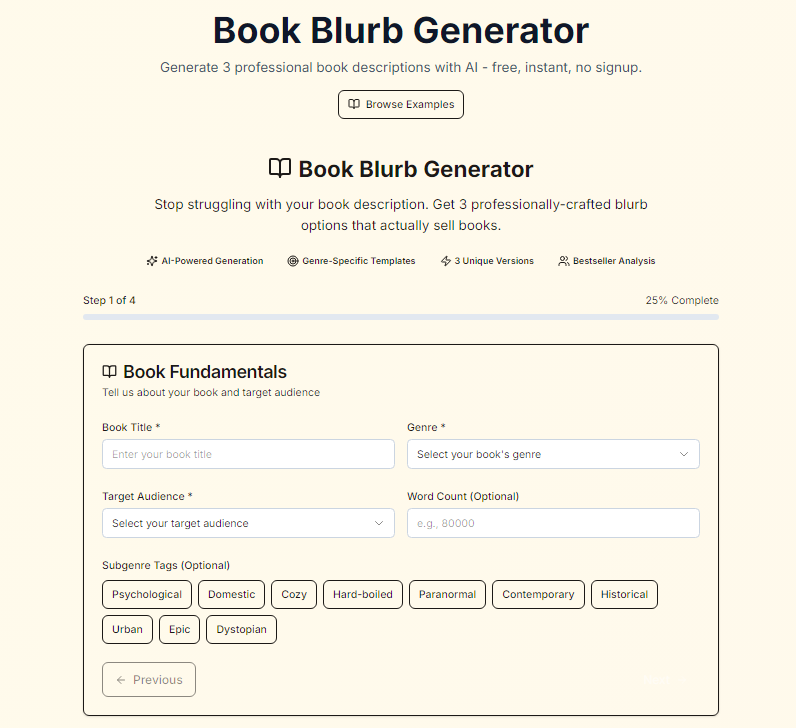
MyStoryFlow book blurb generator
Automateed
Automateed’s blurb generator is built around a proven structure: Hook → Setup → Stakes → Call to Action. Enter your book details, and it produces descriptions designed to stop a browser mid-scroll rather than summarize your plot.
The focus is on the opening — getting the first line right so the rest of the description has somewhere to go. Good starting point if you know your story but keep writing blurbs that read like chapter summaries.
TailoredRead
TailoredRead is primarily a book creation platform — it generates personalized nonfiction books based on your individual goals, interests, and background knowledge. That’s the core product.
They also offer a free description generator on the side. It takes your book title, topic, key takeaways, and target reader, then produces KDP-ready copy — formatted with headline, bullets, and call-to-action. Practical output, no frills. Worth knowing the tool exists, but it’s not their main focus.
HMD Publishing
HMD Publishing’s Amazon Book Description Generator takes your title, genre, synopsis, and audience details and produces KDP-optimized copy — formatted in HTML, ready to paste straight into your listing.
It works for fiction and nonfiction. The output is structured for conversion: stronger opening hooks, genre-appropriate language, and description copy that reads like a real storefront listing rather than a generic AI paragraph.
Good starting point if you want a first draft you can refine, rather than a blank page. Take the output, adjust the tone to match your voice, and you’re most of the way there.
Book Beaver
Book Beaver is mainly a book cover design studio, but they offer a free blurb generator on the side. Input your title, genre, a short summary, and pick a tone — options run from casual and formal through to funny, dark, and pompous. One blurb, generated in seconds, ready to edit before you copy it.
No signup, no account, nothing to install. Simple tool, does one thing. If you also need cover design work, it’s a natural next step from the same site.
Kindlepreneur
Kindlepreneur’s tool solves a different problem than most blurb generators. It doesn’t write your description for you — it formats the one you already have.
Paste your text, apply bold, italics, paragraph spacing, and lists using built-in controls, and it generates clean HTML ready to drop into Amazon, Barnes & Noble, or Kobo. Each platform has different formatting rules, and the tool adjusts automatically depending on which one you select.
There’s an optional AI layer — if your draft needs tightening, you can run it through for clarity and readability improvements. But that’s a polish step, not a generation step.
The practical value is in the formatting. Amazon’s HTML requirements trip up a lot of authors, especially those copying from Word. This removes that friction entirely.
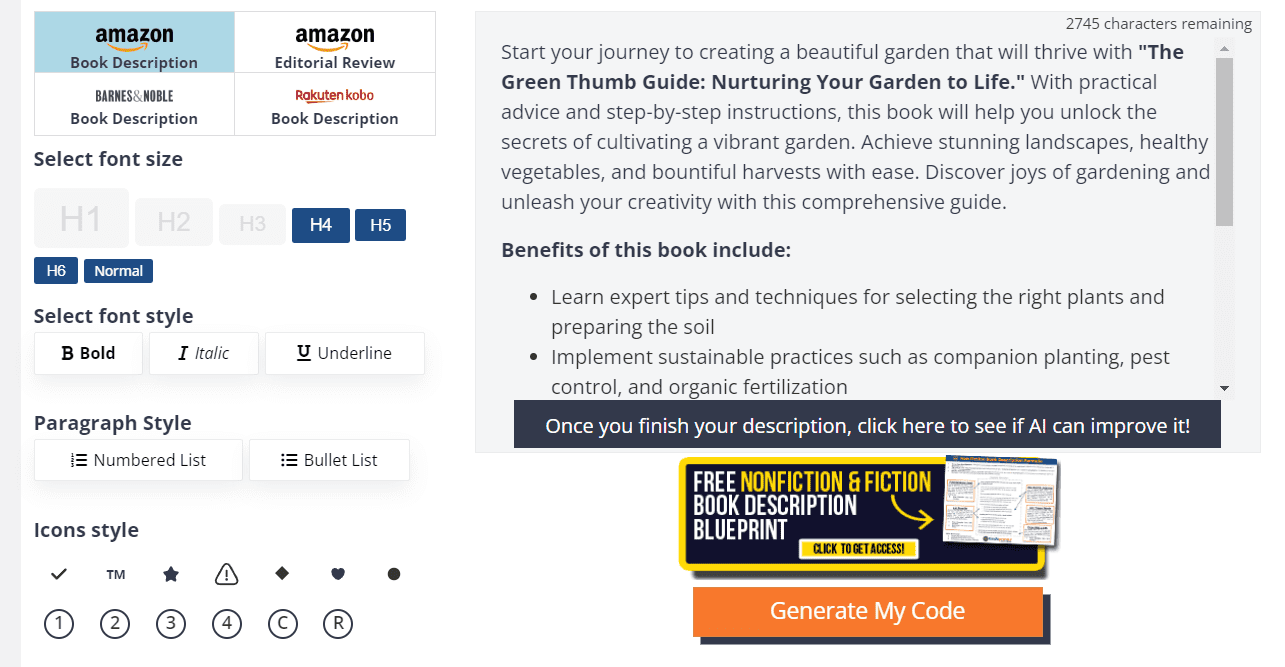
Kindlepreneur book description generator
AI Chatbots for Book Description Generation
General AI chatbots like ChatGPT, Claude, and Gemini can generate book descriptions when prompted correctly. They offer more flexibility than specialized tools but require better prompting.
The advantage: unlimited revisions and customization. You can ask for specific changes, different tones, or multiple variations instantly.
ChatGPT understands genre conventions and can adjust accordingly. Ask for a “literary fiction description” versus a “thriller description” and you’ll get appropriately different results.
Claude excels at nuanced language and can capture subtler emotional tones. Good for literary fiction or complex nonfiction topics.
Gemini integrates well with other Google tools and can research successful descriptions in your genre for comparison.
Choosing the Right Blurb Generator for Your Book
If you have your blurb written and need it formatted correctly for Amazon, Kindlepreneur’s generator is the go-to — you paste your text, apply formatting, and get clean HTML ready to drop into KDP, Barnes & Noble, or Kobo. It’s not a writing tool. It’s a formatting tool. Different job.
If you need to write the blurb from scratch, genre matters more than fiction vs. nonfiction. A psychological thriller needs different language than a cozy mystery. A business book needs a different opening than a memoir. Tools like MyStoryFlow give you three angle options simultaneously — hook-focused, character-driven, situation-based — which is useful when you’re not sure which version of your story sells best.
If you’re comfortable prompting AI directly, a general tool like Claude or ChatGPT will outperform any specialist generator — but only if you know how to brief it well. The specialist tools earn their place by removing that learning curve: structured inputs, genre-aware output, no prompting skills required.
Start with what you have. If you’ve got a draft that needs formatting — Kindlepreneur. If you’re staring at a blank page — pick a generator that matches your genre and treat the output as a first draft, not a final one.
What These Tools Can’t Do
No generator understands your book’s unique voice or specific appeal. They work with templates and patterns, not deep story understanding.
They can’t capture what makes your book different from others in the category. That’s your job as the author.
The emotional core of your story — why readers will actually care — requires human insight. Book blurb generators suggest structure and language, but you provide the heart.
Don’t expect perfect results on the first try. These tools give you raw material to refine, not polished copy to use immediately.
Making Generated Descriptions Work
Start with multiple book description generators to see different approaches. Each tool will emphasize different aspects of your book.
Look for patterns across outputs. If multiple tools suggest similar hooks or themes, you’ve likely identified your book’s strongest selling points.
Test different versions with your target audience. Share generated descriptions with beta readers or author groups for feedback. Remember that book descriptions can be updated. Start with a generated version, then refine based on reader response and sales data.
The best descriptions combine AI efficiency with human insight. Let the tools handle structure and initial language, then add your unique perspective and voice.
For more tools to support your publishing journey, check out our AI Tools Directory.